目录
  1. 云南汉王科技Java8 SpringBoot框架开发培训
  2. 一、预备知识
    1. RESTful API
    2. SpringBoot
    3. MyBatis Plus
    4. Lombok
    5. Swagger2
  3. 二、创建项目
    1. 使用IDEA创建一个名为SpringBootTrain的项目
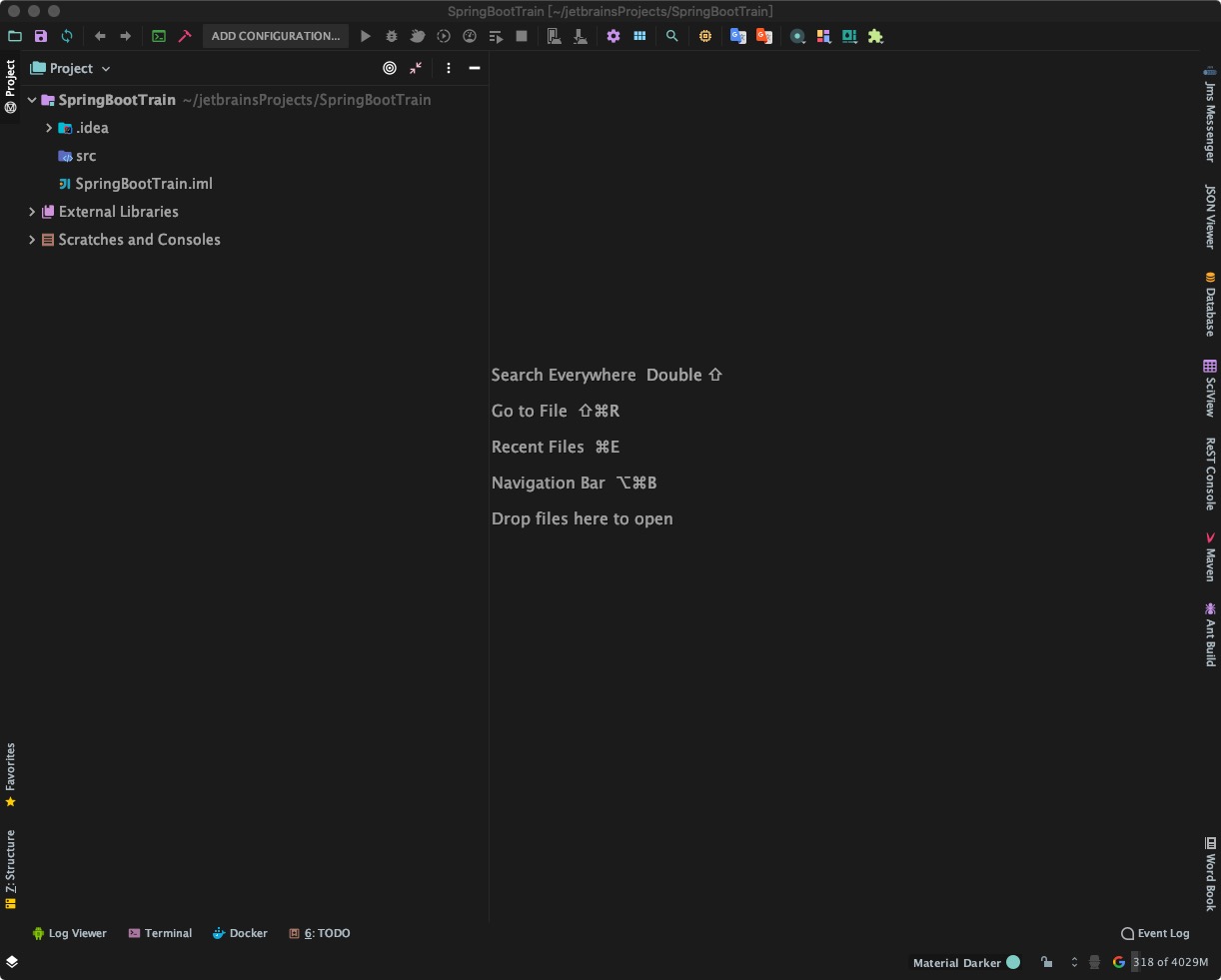
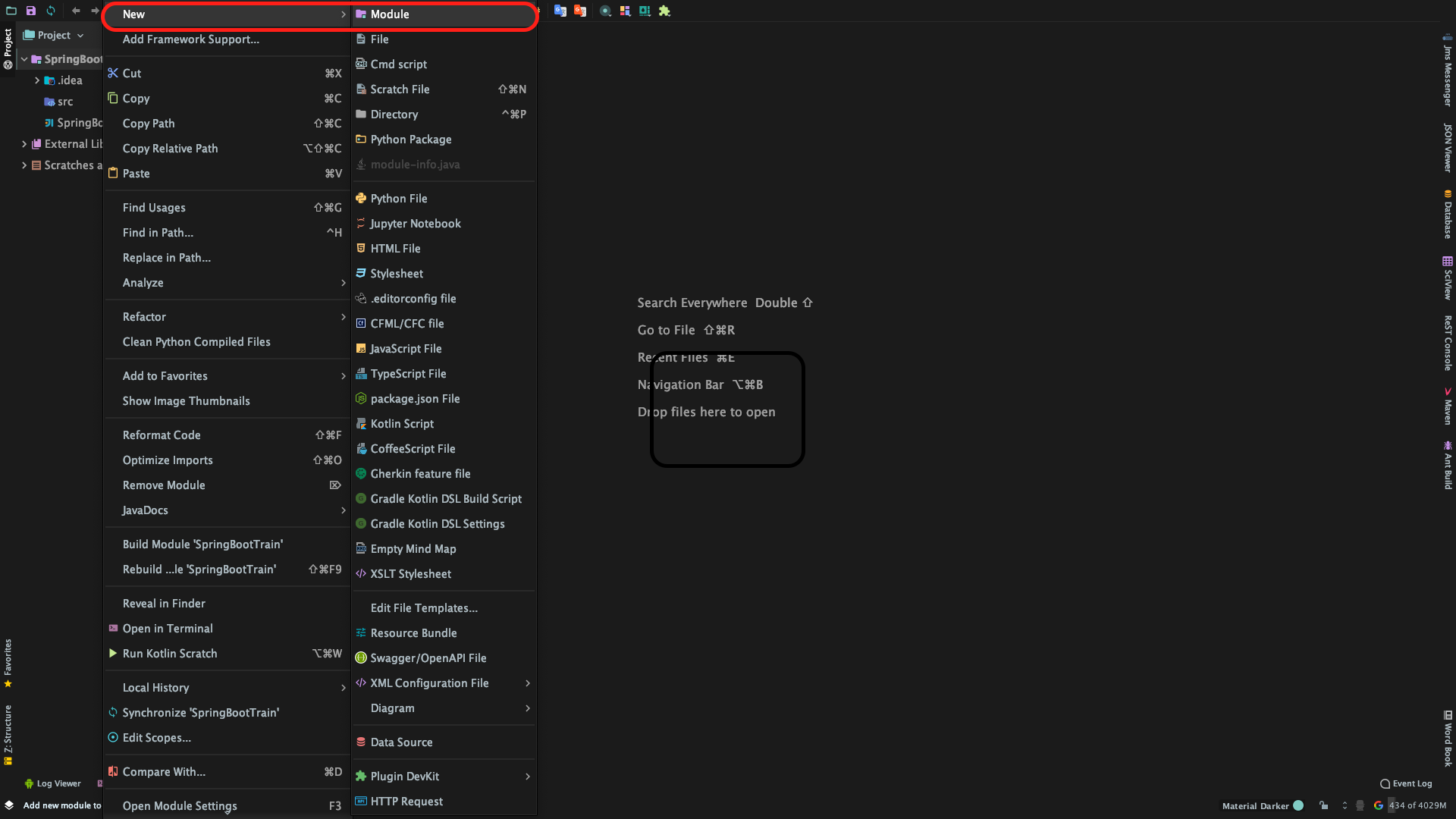
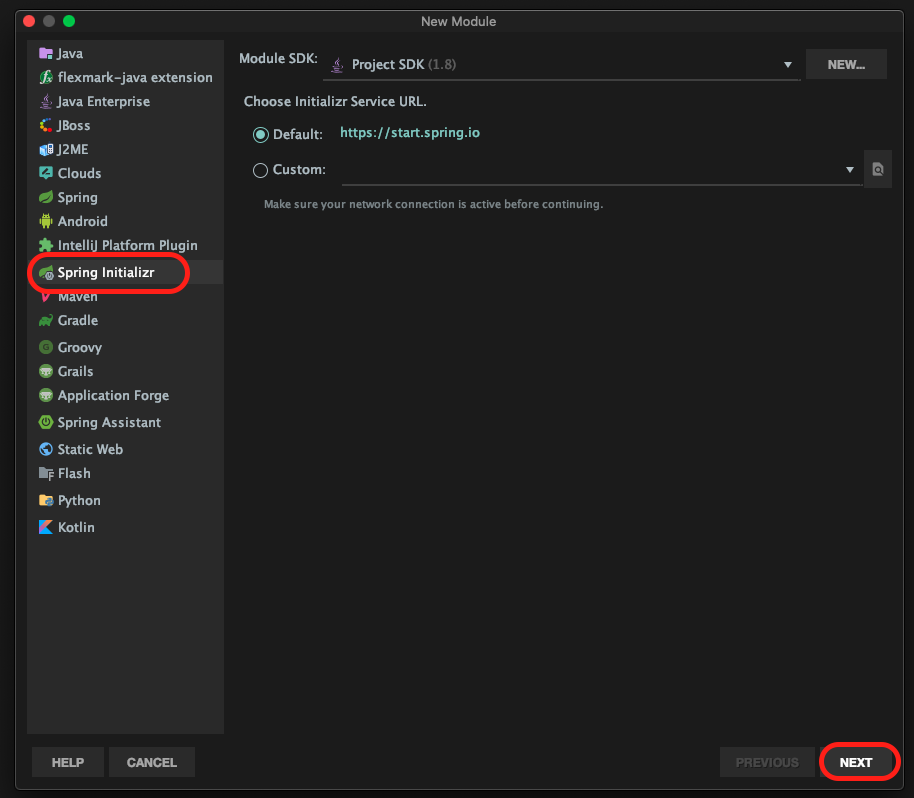
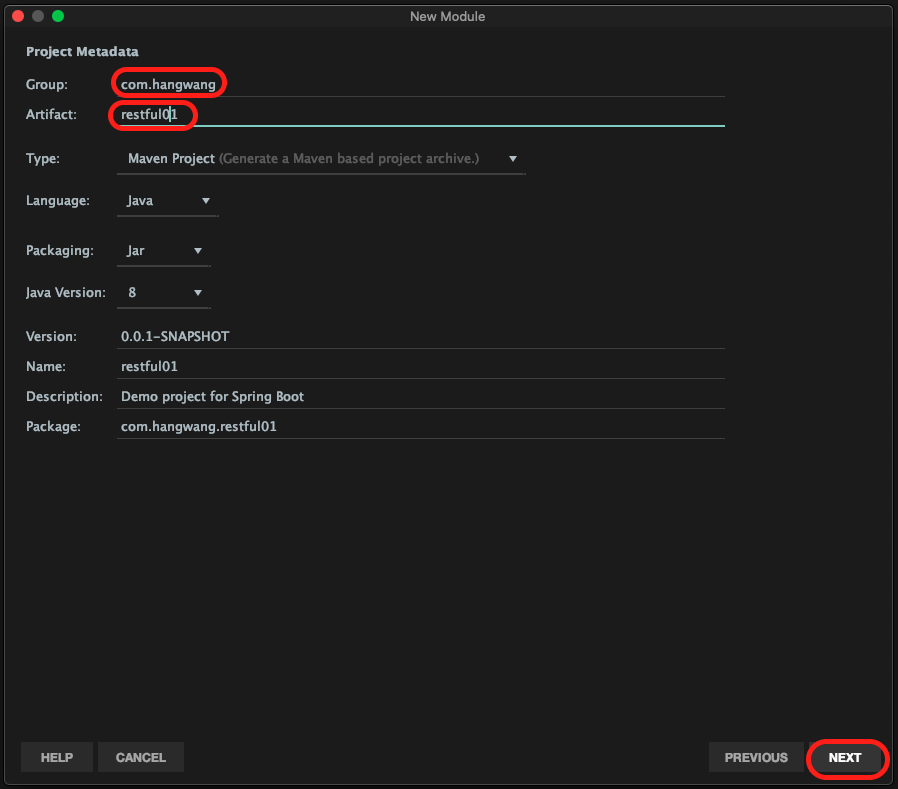
    2. 在刚刚创建的Project中创建Module(模块)
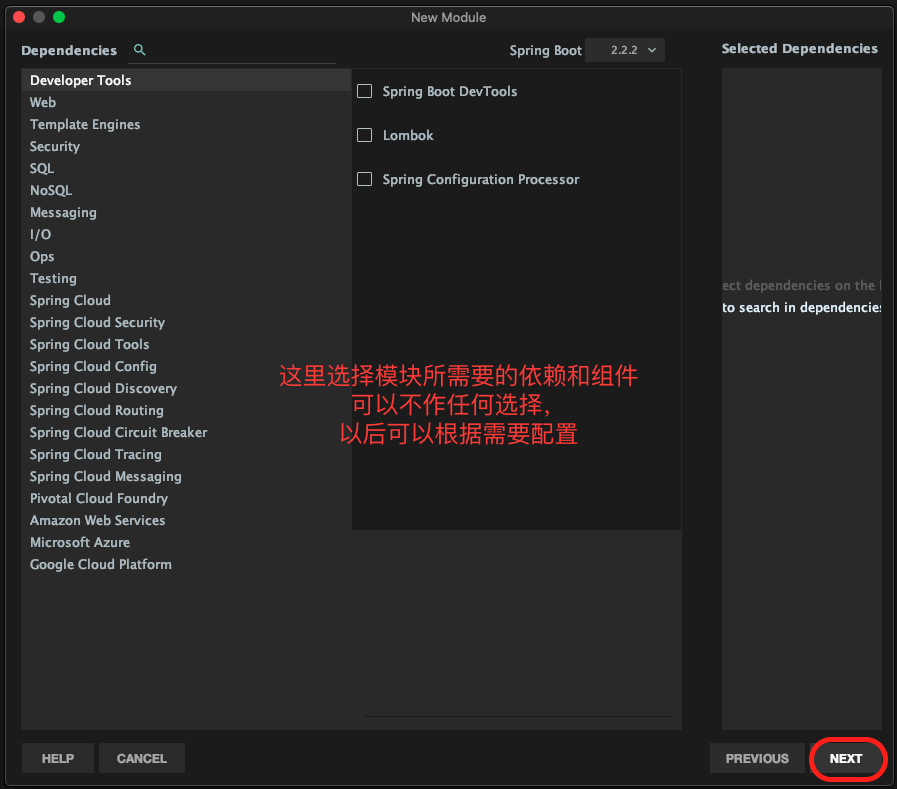
    3. 配置组件和依赖包
      1. 在<dependencies><\dependencies>中添加需要的组件和依赖包
      2. 在<plugins><\plugins>中添加如下内容,指定打包方式
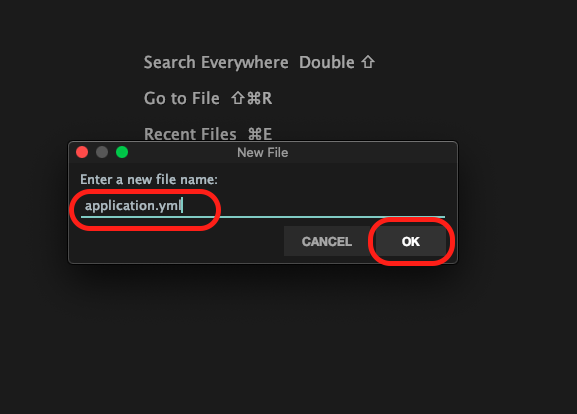
    4. 新建模块application.yml配置文件并配置SpringBoot
      1. 新建模块application.yml配置文件
      2. 配置SpringBoot
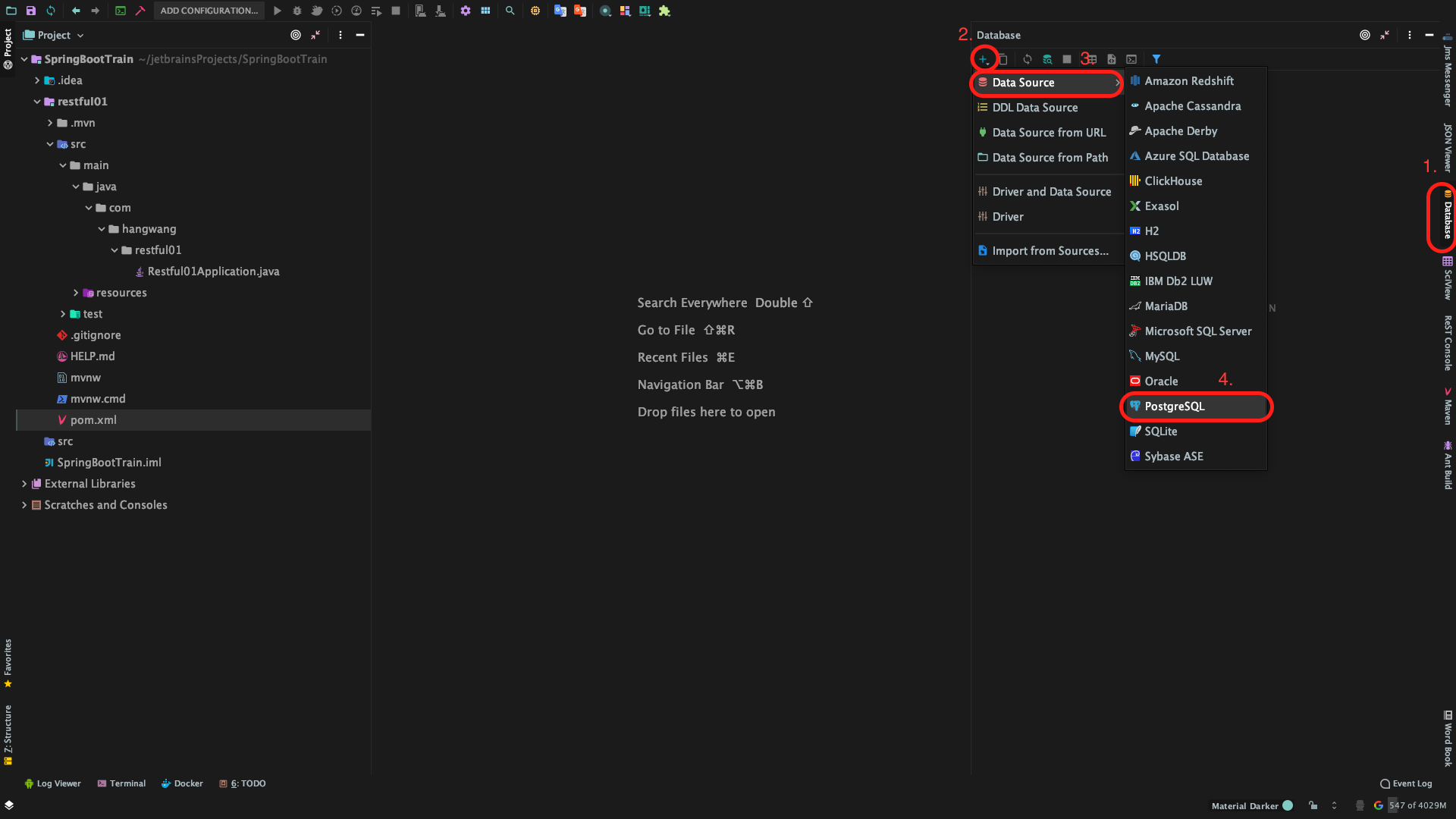
    5. 配置IDEA的数据库可视化发开组件
      1. 新建数据库连接
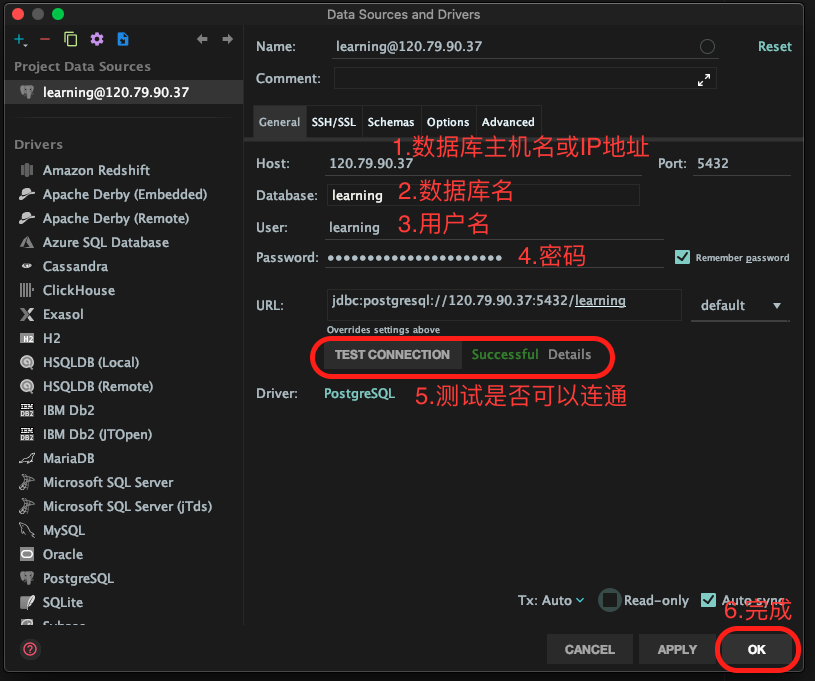
      2. 配置数据库连接方式
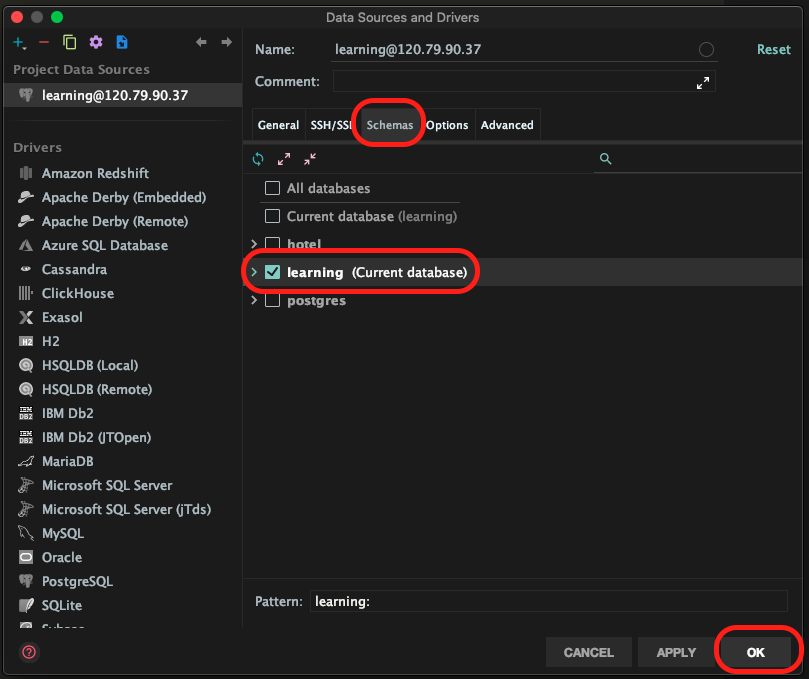
      3. 选择数据库和框架
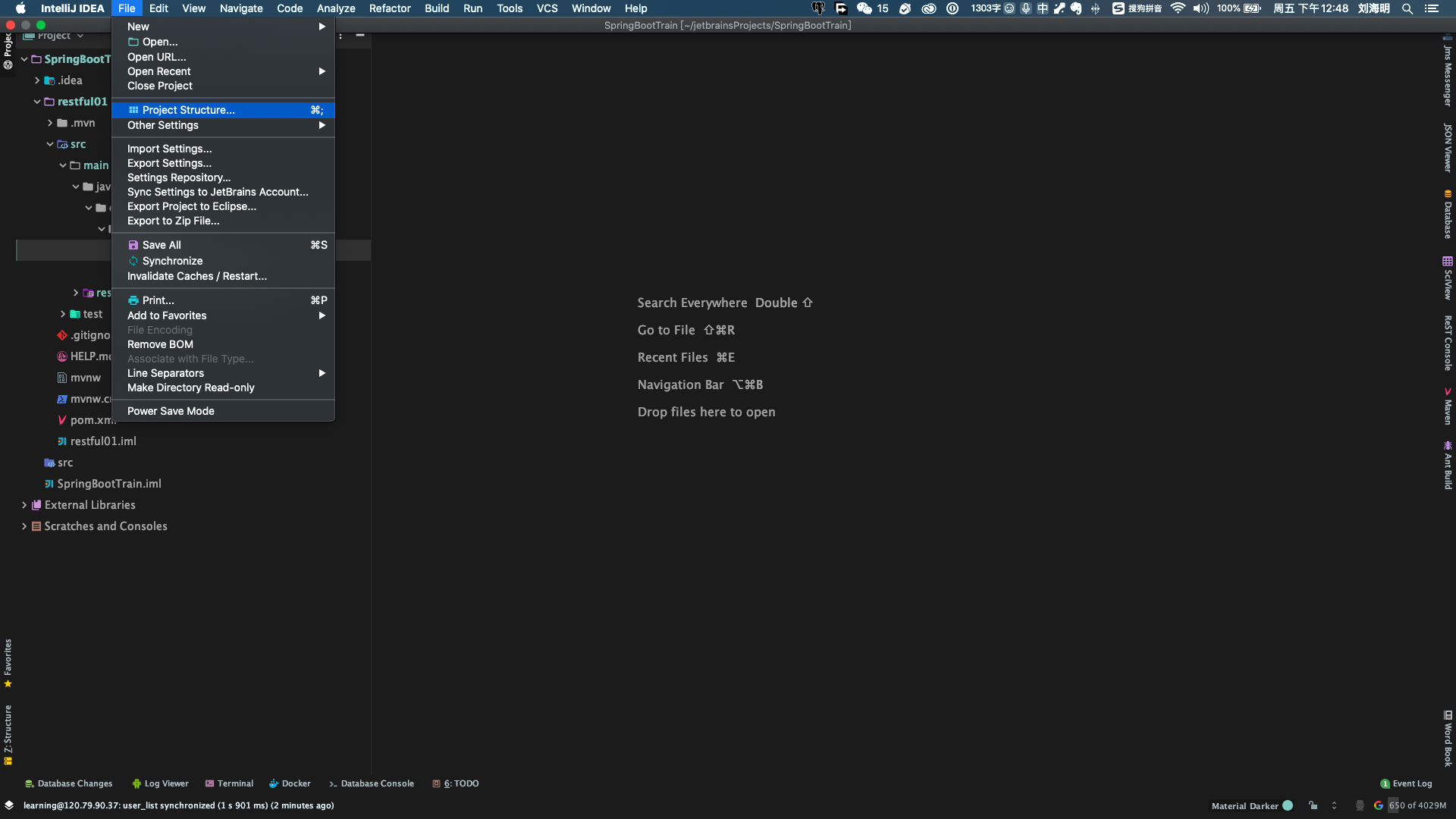
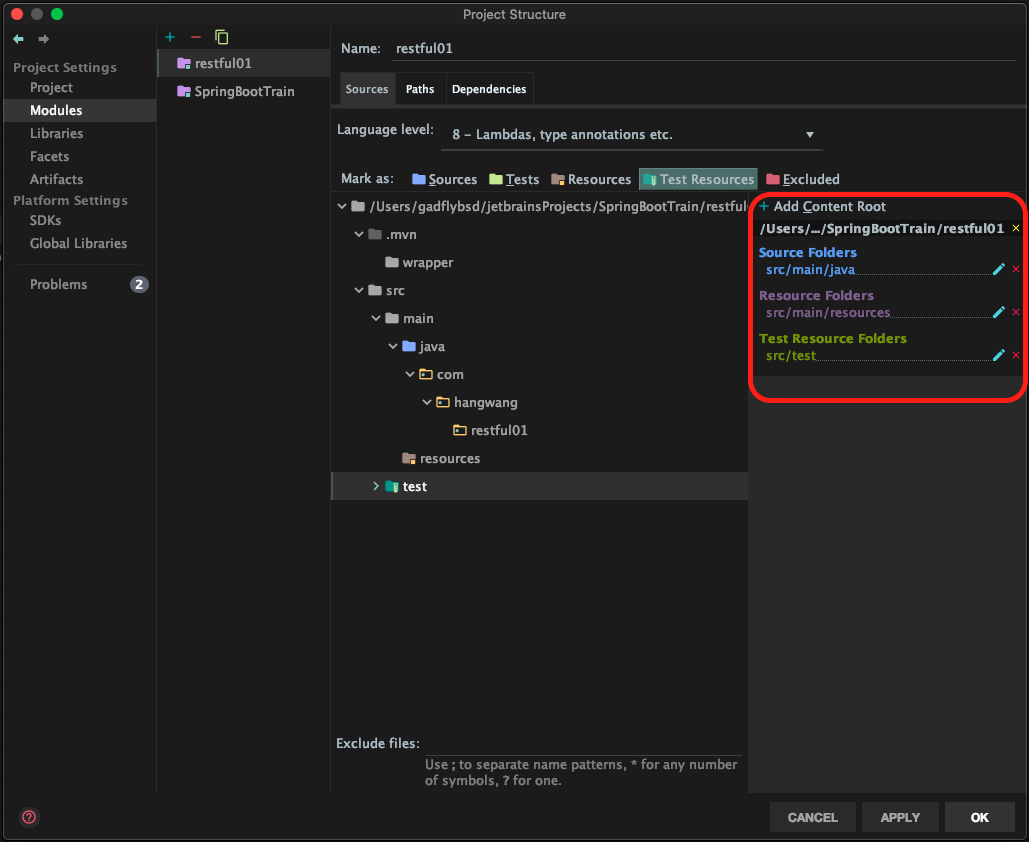
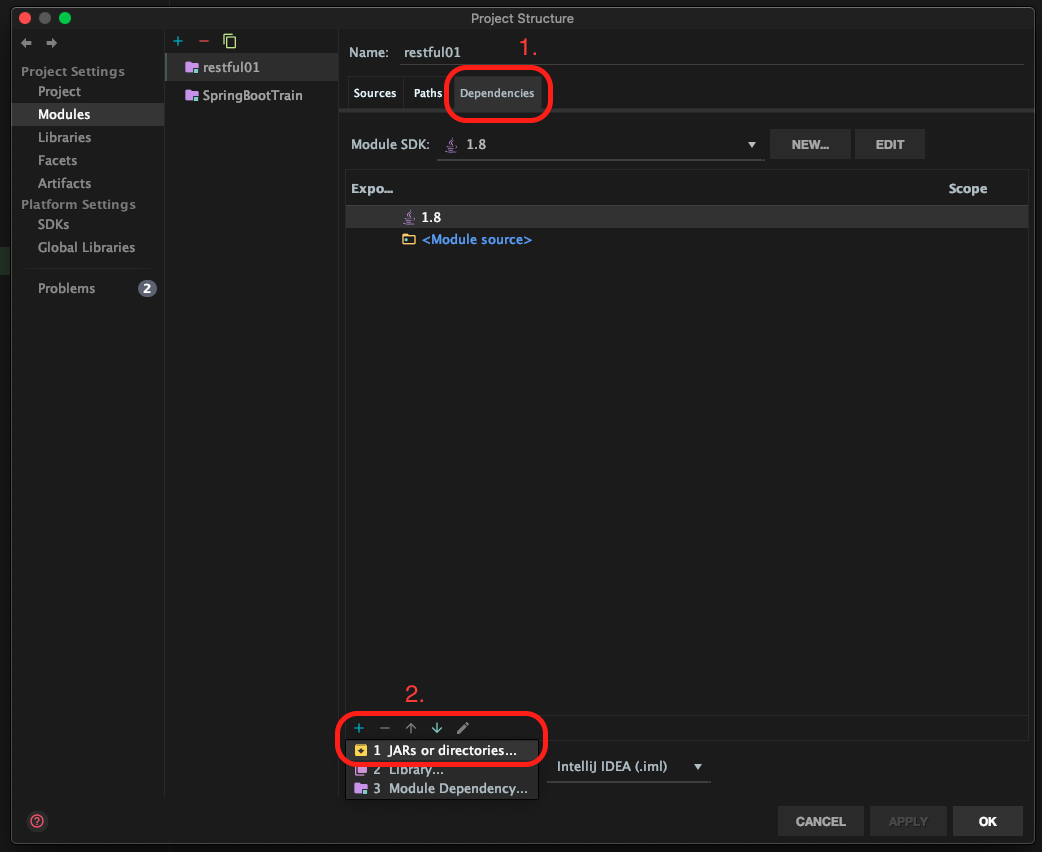
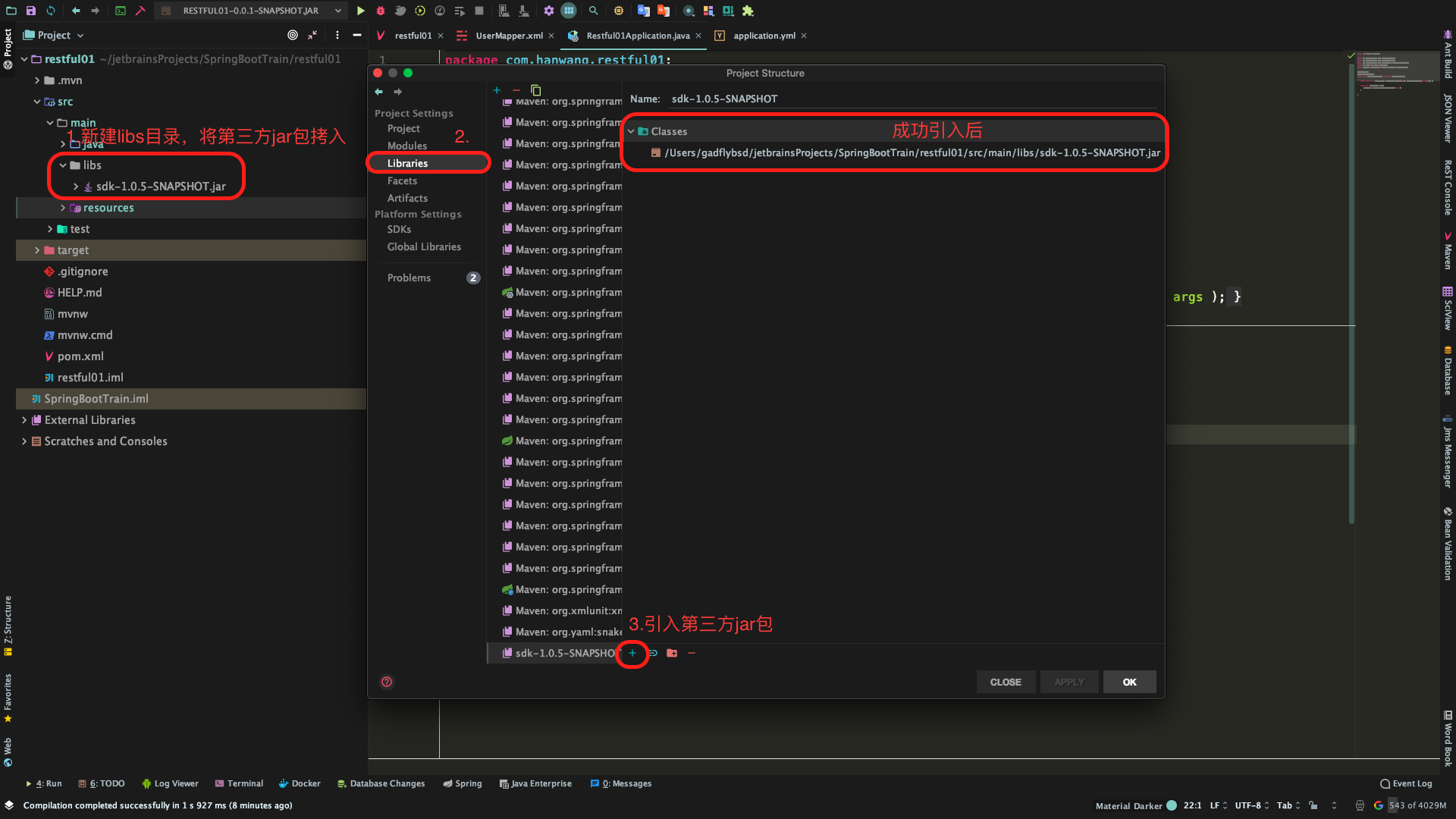
    6. 配置Project Structure项目结构
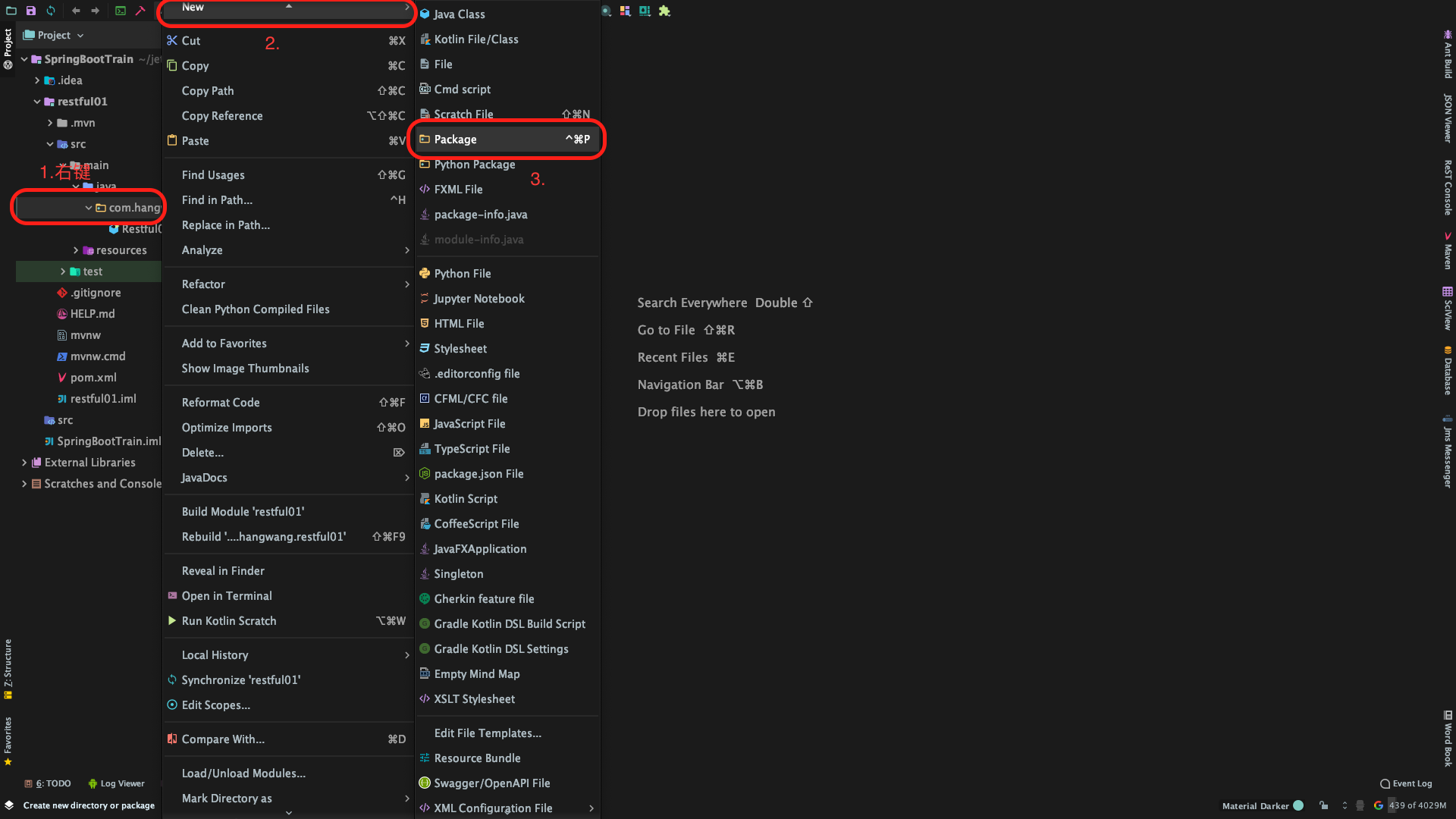
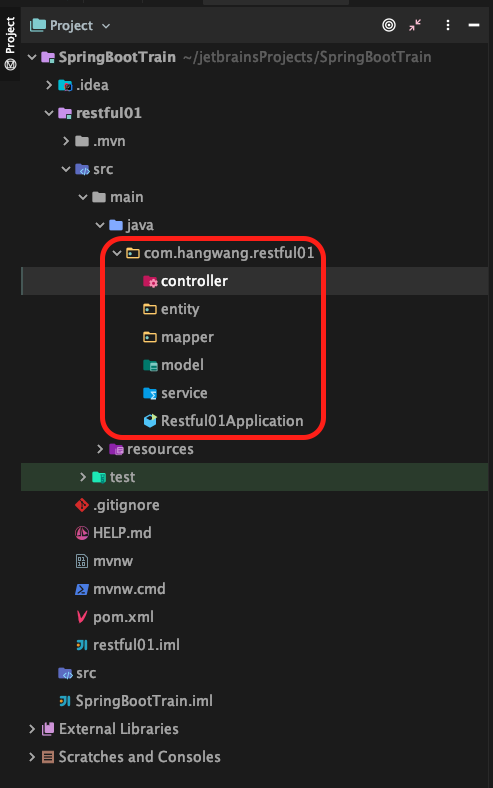
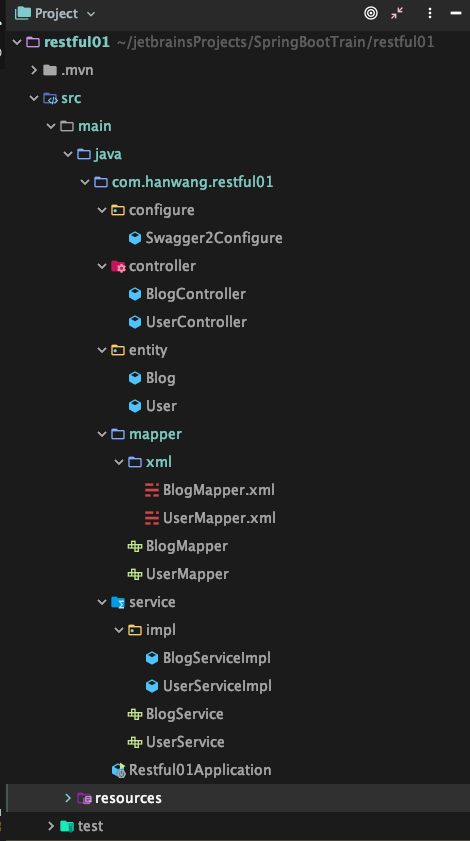
    7. 新建Package包
  4. 三、开发编程
    1. 在configure包中新建MybatisPlus的配置类MybatisPlusConfigure.class
    2. 在configure包中新建Swagger2的配置类Swagger2Configure.class
    3. 在entity包中新建数据库表user的实体类User.class
    4. 在mapper包中新建数据库表user的数据库映射接口UserMapper.class
    5. 在mapper.xml包中新建数据库表user的实体类UserMapper.xml
    6. 在service包中新建服务接口UserService.class
    7. 在service.impl包中新建服务接口的实现类UserServiceImpl.class
    8. 在controller包中新建控制器类UserController.class
  5. 四、测试运行
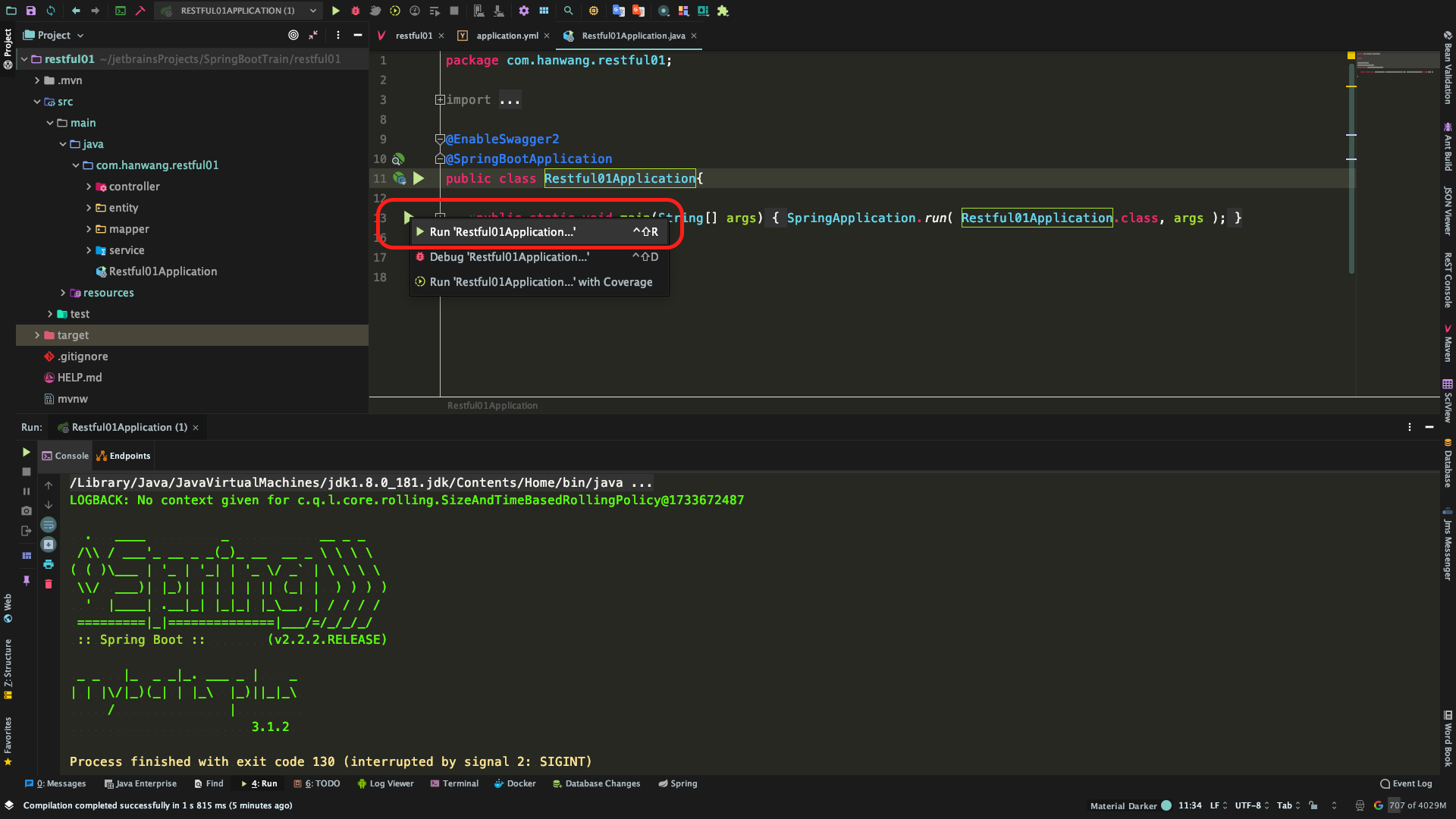
    1. 在模块入口文件打开swagger2
    2. 运行
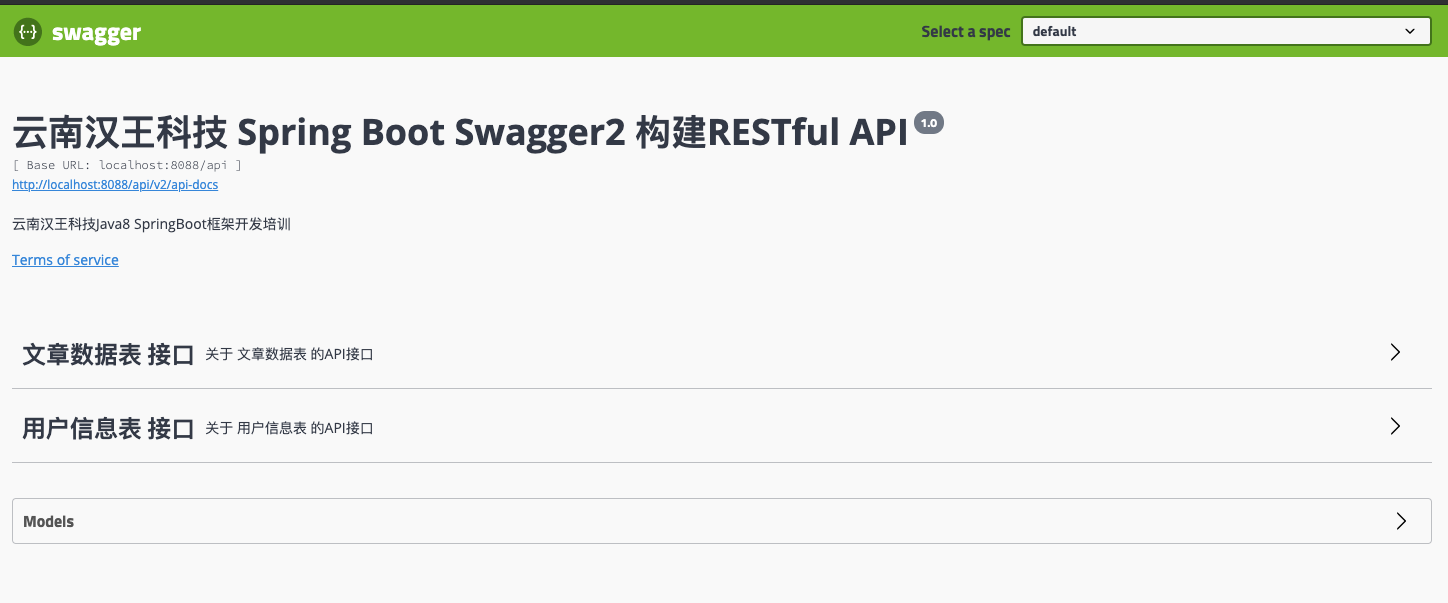
    3. 浏览器测试
  6. 五、换种姿势开发
    1. 删除刚刚创建的entity、service、mapper、controller包,及里面的所有内容
    2. 修改模块入口文件Restful01Application.class
    3. 运行模块 --> 停止运行
    4. 自动生成代码
    5. 注释掉代码生成器
  7. 六、打包分发
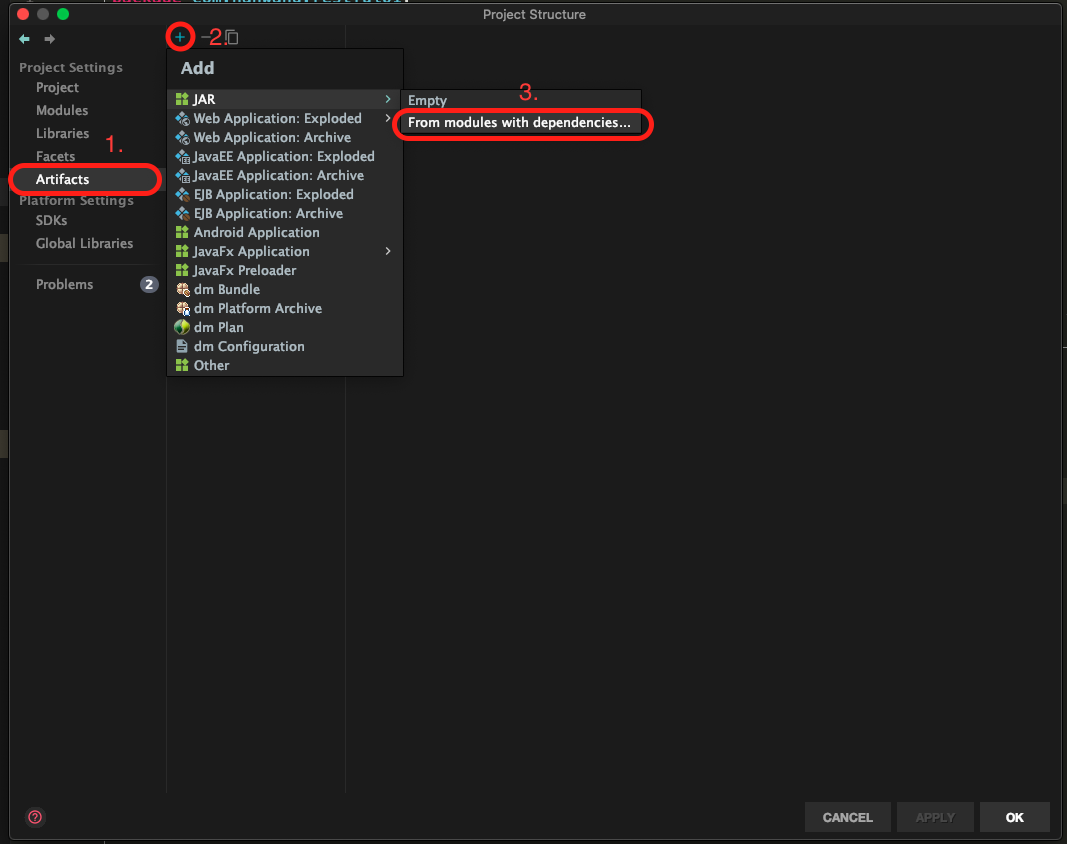
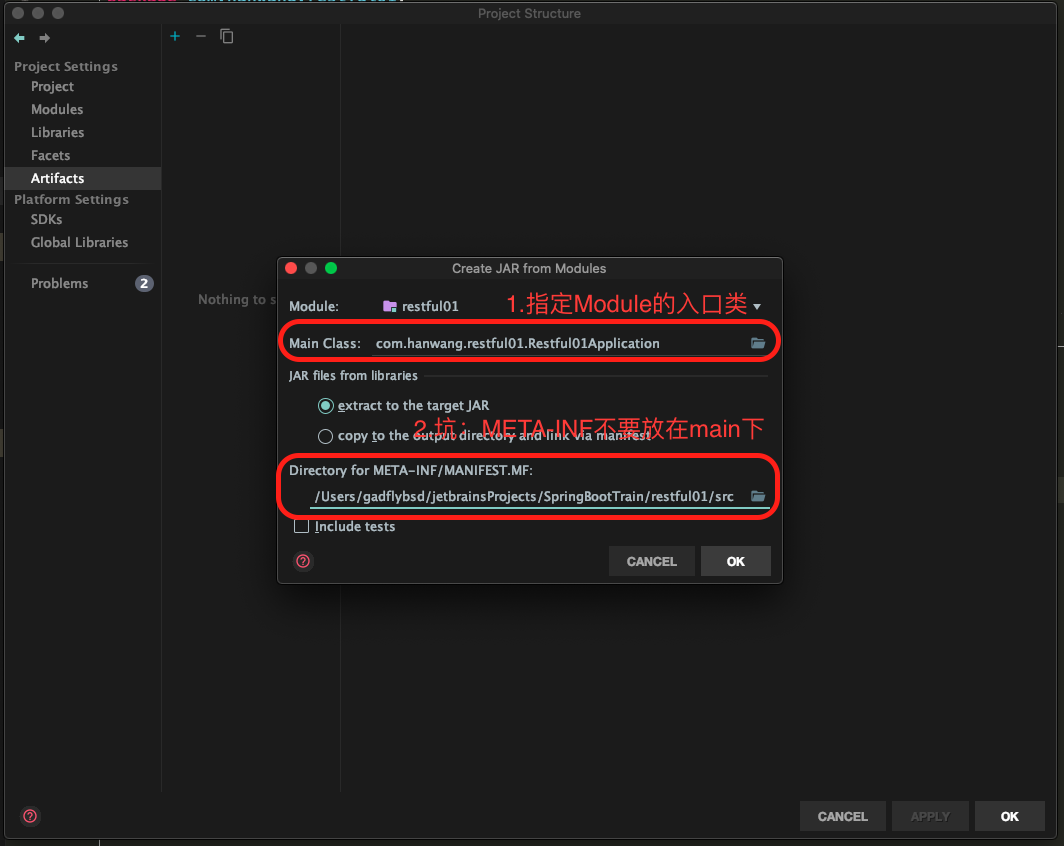
    1. 重新引入第三方jar包
    2. 修改pom.xml 指定Marven的第三方包引入路径
    3. 部署
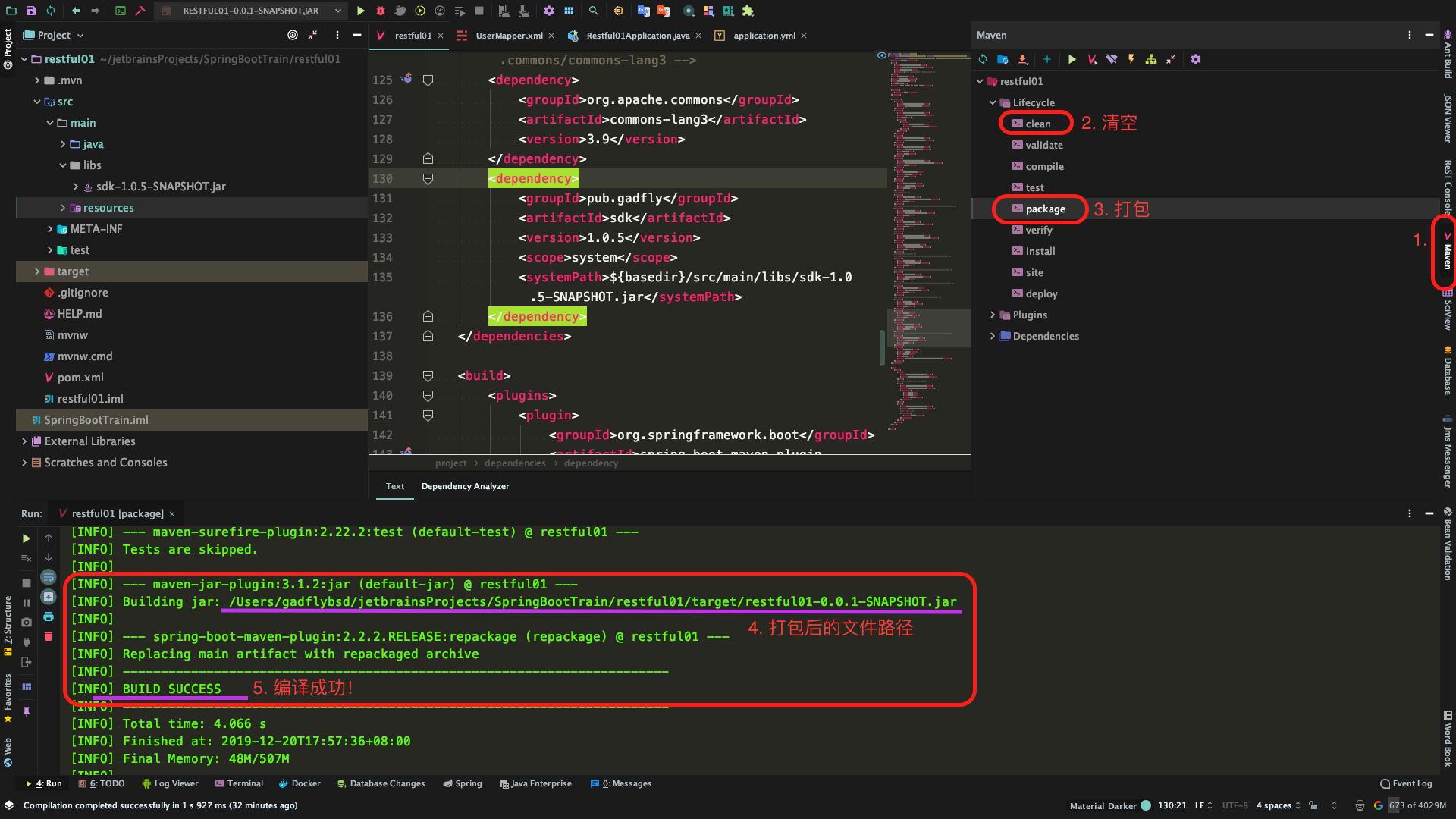
    4. 打包
内部培训:使用IDEA创建SpringBoot的API项目

云南汉王科技Java8 SpringBoot框架开发培训

  本次培训将通过IntelliJ IDEA编程语言开发的集成环境创建一个SpringBoot项目,在该项目中整合MyBatis PlusLombokSwagger2现实一个标准的有两张数据库表(用户资料表、文章信息表)的简易个人博客的服务器端RESTful API开发。

一、预备知识

  • RESTful API

    是目前最流行的 API 设计规范,用于 Web 数据接口的设计。具体参看《阮一峰:RESTful API 最佳实践》

  • SpringBoot

    • Spring Boot 官网
    • Spring Boot 百度百科
    • Spring Boot是一个简化Spring开发的框架。通过简化配置来进一步简化了Spring应用的整个搭建和开发过程。
    • 在使用Spring Boot时只需要配置相应的Spring Boot就可以用所有的Spring组件,简单的说,spring boot就是整合了很多优秀的框架,不用我们自己手动的去写一堆xml配置然后进行配置。从本质上来说,Spring Boot就是Spring,它做了那些没有它你也会去做的Spring Bean配置。
  • MyBatis Plus

    使用Mybatis发现需要在mapper.xml中写很多重复的简单CRUD(增删改查),使用MybatisPlus可以大大简化这部分代码,在MyBatis 的基础上只做增强不做改变,为简化开发、提高效率而生。

    • MyBatis Plus 官网
    • 特性
      • 无侵入

        只做增强不做改变,引入它不会对现有工程产生影响,如丝般顺滑

      • 损耗小

        启动即会自动注入基本 CURD,性能基本无损耗,直接面向对象操作

      • 强大的 CRUD 操作

        内置通用 Mapper、通用 Service,仅仅通过少量配置即可实现单表大部分 CRUD 操作,更有强大的条件构造器,满足各类使用需求

      • 支持 Lambda 形式调用

        通过 Lambda 表达式,方便的编写各类查询条件,无需再担心字段写错,Java8中让人又爱又恨的Lambda表达式

      • 支持多种数据库

        支持 MySQL、MariaDB、Oracle、DB2、H2、HSQL、SQLite、Postgre、SQLServer2005、SQLServer 等多种数据库

      • 支持主键自动生成

        支持多达 4 种主键策略(内含分布式唯一 ID 生成器 - Sequence),可自由配置,完美解决主键问题

      • 支持 XML 热加载

        Mapper 对应的 XML 支持热加载,对于简单的 CRUD 操作,甚至可以无 XML 启动

      • 支持 ActiveRecord 模式

        支持 ActiveRecord 形式调用,实体类只需继承 Model 类即可进行强大的 CRUD 操作

      • 支持自定义全局通用操作

        支持全局通用方法注入( Write once, use anywhere )

      • 支持关键词自动转义

        支持数据库关键词(order、key……)自动转义,还可自定义关键词

      • 内置代码生成器

        采用代码或者 Maven 插件可快速生成 Mapper 、 Model 、 Service 、 Controller 层代码,支持模板引擎,更有超多自定义配置等您来使用

      • 内置分页插件

        基于 MyBatis 物理分页,开发者无需关心具体操作,配置好插件之后,写分页等同于普通 List 查询

      • 内置性能分析插件

        可输出 Sql 语句以及其执行时间,建议开发测试时启用该功能,能快速揪出慢查询

      • 内置全局拦截插件

        提供全表 delete 、 update 操作智能分析阻断,也可自定义拦截规则,预防误操作

      • 内置 Sql 注入剥离器

        支持 Sql 注入剥离,有效预防 Sql 注入攻击

    • 核心功能
      • 代码生成器

        AutoGenerator 是 MyBatis-Plus 的代码生成器,通过 AutoGenerator 可以快速生成 Entity、Mapper、Mapper XML、Service、Controller等各个模块的代码,极大的提升了开发效率。

      • CRUD 接口

        即增删改查数据库接口

      • 条件构造器

        几乎涵盖所有的数据库查询where条件,并支持原始sql。

      • 分页插件

        可通过mybatis-plus 自动分页。

      • Sequence主键

        实体主键支持Sequence,自动生成主键。

    • 扩展插件
      • 通用枚举

        解决了繁琐的配置,让 mybatis 优雅的使用枚举属性!

      • 性能分析插件

        性能分析拦截器,用于输出每条 SQL 语句及其执行时间

      • 动态数据源

        基于springboot的快速集成多数据源

      • 分布式事务

        支持 rabbit 实现可靠消息分布式事务

  • Lombok

    • Lombok 官网
    • Lombok简介、使用、工作原理、优缺点
    • Lombok能以简单的注解形式来简化java代码,提高开发人员的开发效率。例如开发中经常需要写的javabean,都需要花时间去添加相应的getter/setter,也许还要去写构造器、equals等方法,而且需要维护,当属性多时会出现大量的getter/setter方法,这些显得很冗长也没有太多技术含量,一旦修改属性,就容易出现忘记修改对应方法的失误。
    • Lombok能通过注解的方式,在编译时自动为属性生成构造器、getter/setter、equals、hashcode、toString方法。出现的神奇就是在源码中没有getter和setter方法,但是在编译生成的字节码文件中有getter和setter方法。这样就省去了手动重建这些代码的麻烦,使代码看起来更简洁些。
  • Swagger2

    • Swagger2 官网
    • 自动生成在线API接口文档
    • 由于Spring Boot能够快速开发、便捷部署等特性,相信有很大一部分Spring Boot的用户会用来构建RESTful API。而我们构建RESTful
    • API的目的通常都是由于多终端的原因,这些终端会共用很多底层业务逻辑,因此我们会抽象出这样一层来同时服务于多个移动端或者Web前端。

二、创建项目

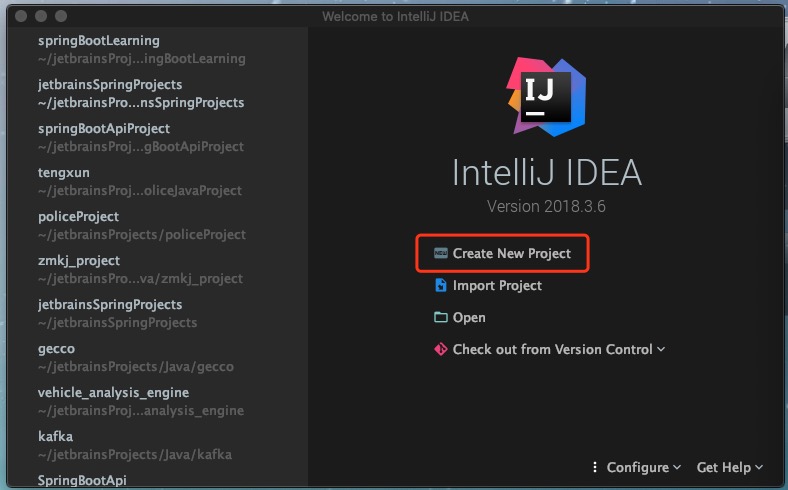
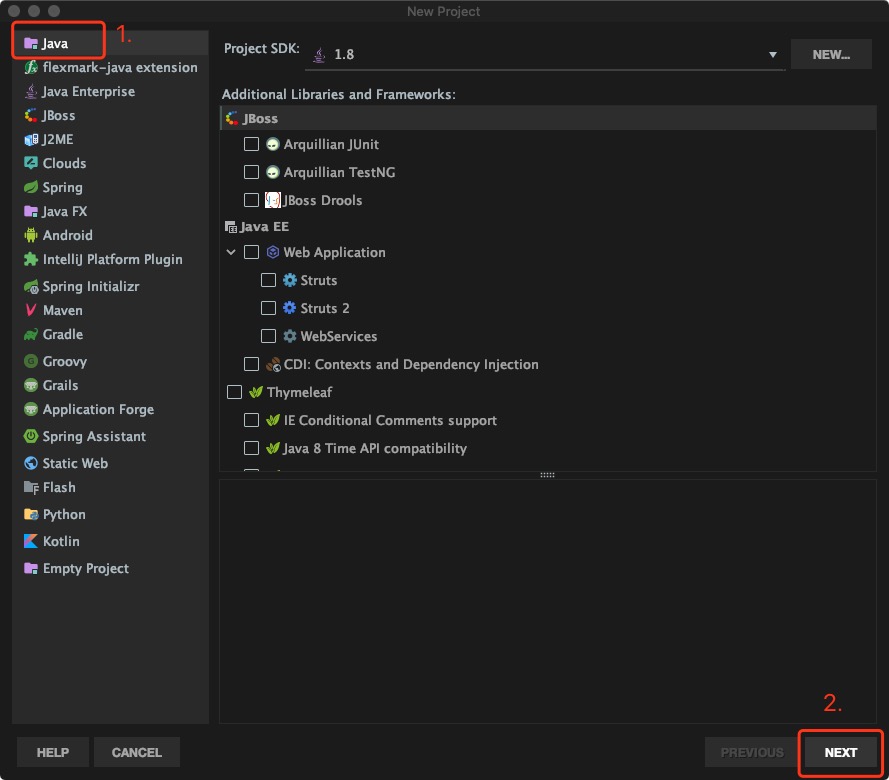
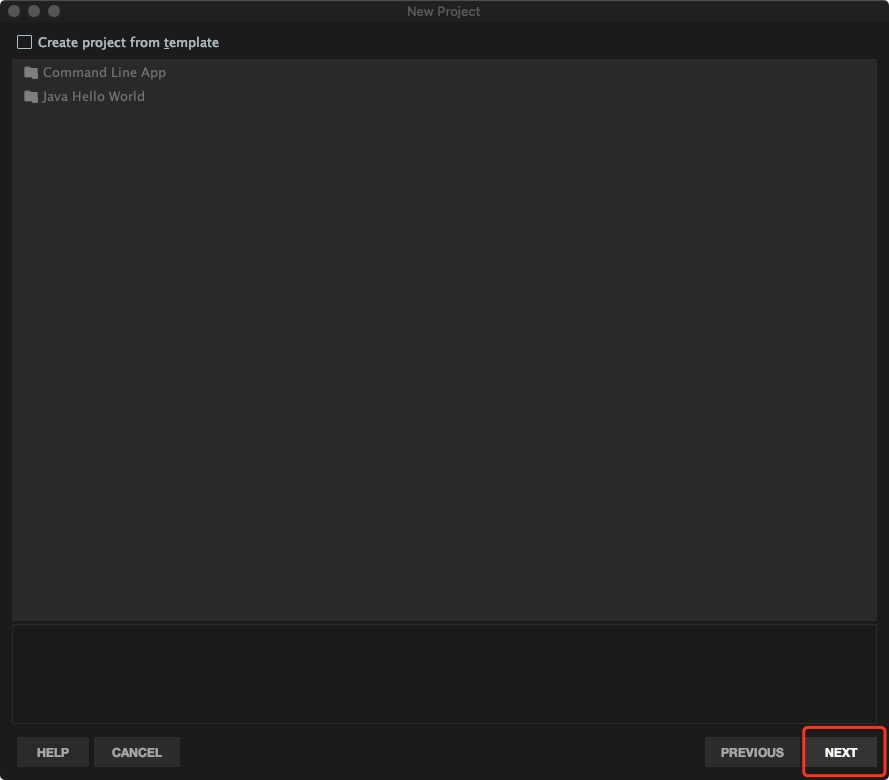
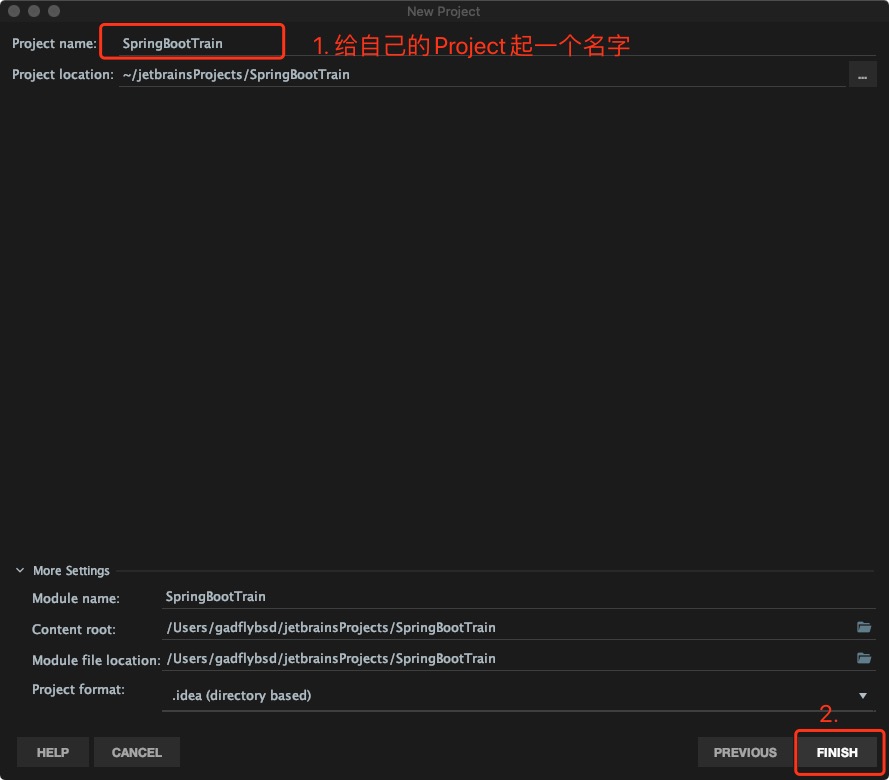
  1. 使用IDEA创建一个名为SpringBootTrain的项目

    Project(项目):项目工程工作空间,相当于Eclipse中的Workspace(工作空间)

    • Step 1:
    • Step 2:
    • Step 3:
    • Step 4:
    • Step 5:
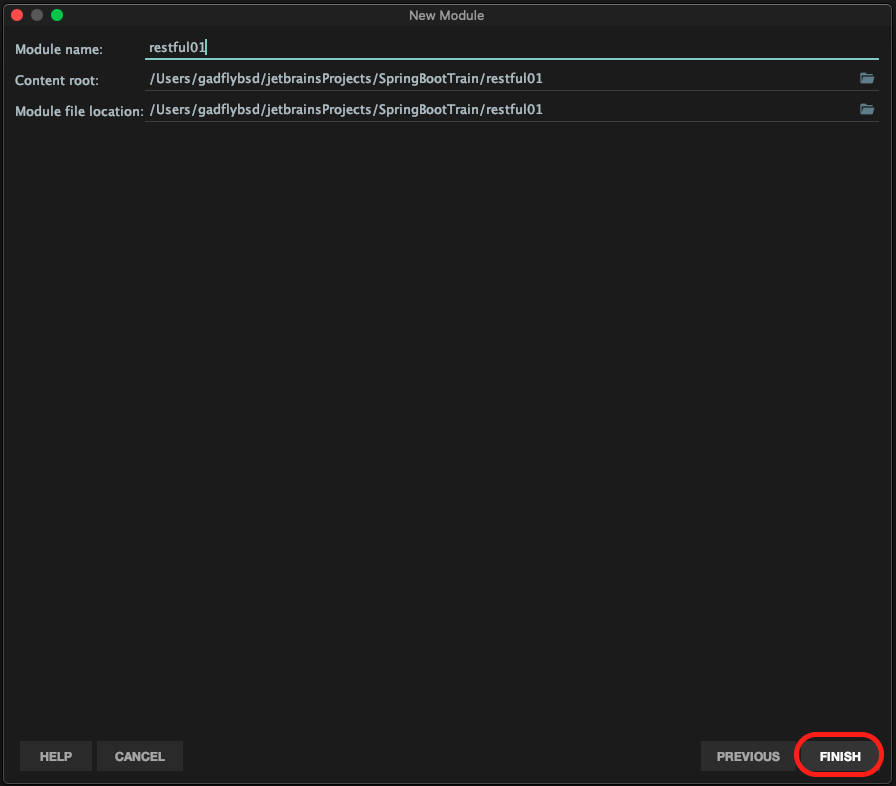
  2. 在刚刚创建的Project中创建Module(模块)

    Module(模块):EclipseProject 相当于 IDEA 中的 Module

    • Step 1:

    • Step 2:

    • Step 3:

    • Step 4:

    • Step 5:

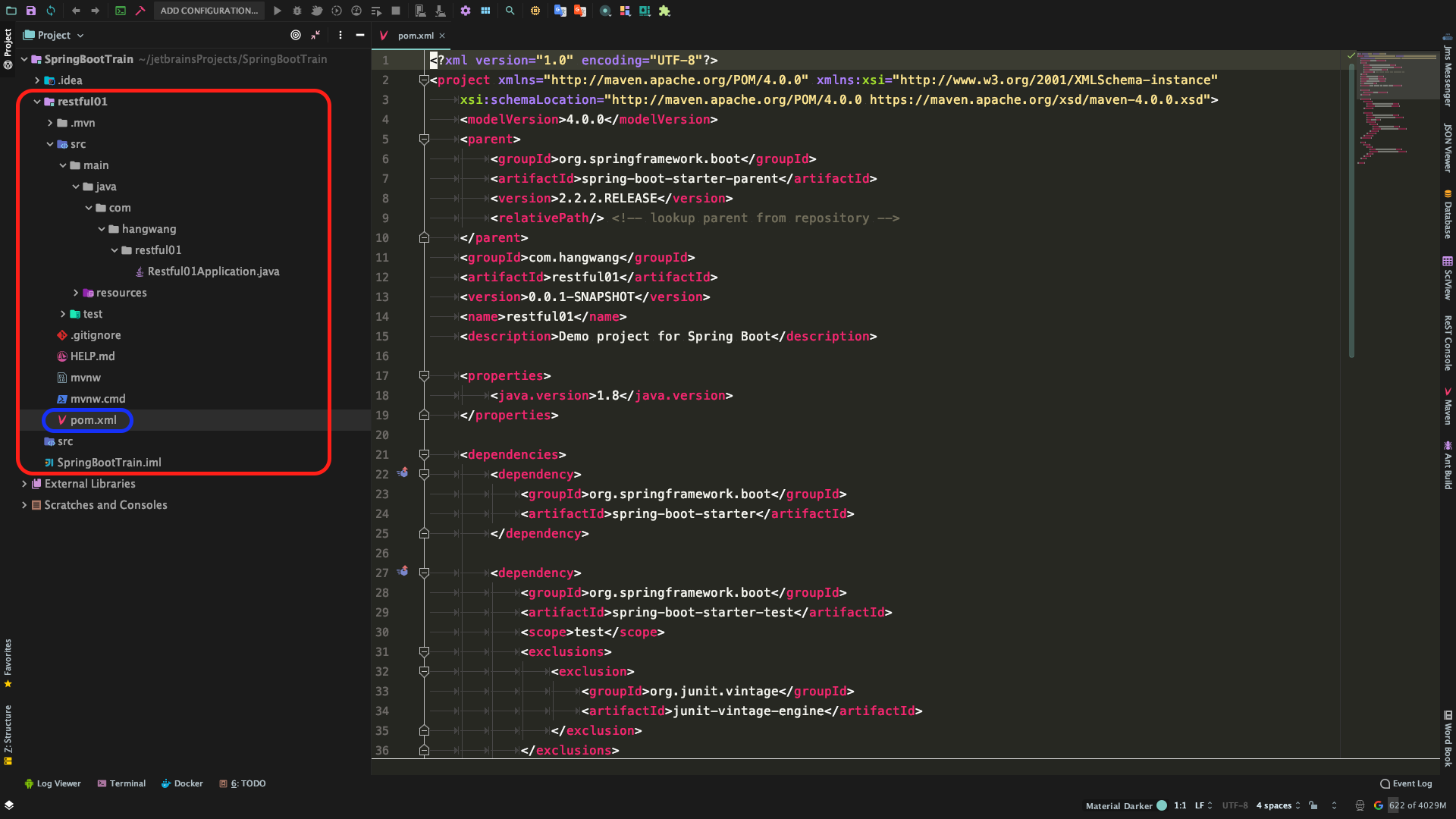
    • Step 6:打开新创建的Restful01模块中的pom.xml文件手动配置组件和依赖包

  3. 配置组件和依赖包

  • <dependencies><\dependencies>中添加需要的组件和依赖包

    <dependency>
    <groupId>org.springframework.boot</groupId>
    <artifactId>spring-boot-starter-web</artifactId>
    </dependency>
    <dependency>
    <groupId>org.springframework.boot</groupId>
    <artifactId>spring-boot-devtools</artifactId>
    <scope>runtime</scope>
    <optional>true</optional>
    </dependency>
    <dependency>
    <groupId>org.springframework.boot</groupId>
    <artifactId>spring-boot-configuration-processor</artifactId>
    <optional>true</optional>
    </dependency>
    <dependency>
    <groupId>org.projectlombok</groupId>
    <artifactId>lombok</artifactId>
    <optional>true</optional>
    </dependency>
    <dependency>
    <groupId>org.postgresql</groupId>
    <artifactId>postgresql</artifactId>
    <version>42.2.8</version>
    </dependency>
    <!-- mybatis-plus -->
    <dependency>
    <groupId>com.baomidou</groupId>
    <artifactId>mybatisplus-spring-boot-starter</artifactId>
    <version>1.0.5</version>
    </dependency>
    <!-- https://mvnrepository.com/artifact/com.baomidou/mybatis-plus-boot-starter -->
    <dependency>
    <groupId>com.baomidou</groupId>
    <artifactId>mybatis-plus-boot-starter</artifactId>
    <version>3.1.2</version>
    </dependency>
    <dependency>
    <groupId>com.baomidou</groupId>
    <artifactId>mybatis-plus-generator</artifactId>
    <version>3.1.2</version>
    </dependency>
    <!-- 模版引擎 -->
    <dependency>
    <groupId>org.springframework.boot</groupId>
    <artifactId>spring-boot-starter-freemarker</artifactId>
    </dependency>
    <dependency>
    <groupId>org.apache.velocity</groupId>
    <artifactId>velocity-engine-core</artifactId>
    <version>2.0</version>
    </dependency>
    <!-- SpringBoot整合Swagger2 -->
    <!-- https://mvnrepository.com/artifact/io.springfox/springfox-swagger2 -->
    <dependency>
    <groupId>io.springfox</groupId>
    <artifactId>springfox-swagger2</artifactId>
    <version>2.9.2</version>
    </dependency>
    <!-- https://mvnrepository.com/artifact/io.springfox/springfox-swagger-ui -->
    <dependency>
    <groupId>io.springfox</groupId>
    <artifactId>springfox-swagger-ui</artifactId>
    <version>2.9.2</version>
    </dependency>
    <!-- https://mvnrepository.com/artifact/commons-beanutils/commons-beanutils -->
    <dependency>
    <groupId>commons-beanutils</groupId>
    <artifactId>commons-beanutils</artifactId>
    <version>1.9.4</version>
    </dependency>
    <!-- https://mvnrepository.com/artifact/org.yaml/snakeyaml -->
    <dependency>
    <groupId>org.yaml</groupId>
    <artifactId>snakeyaml</artifactId>
    <version>1.25</version>
    </dependency>
    <dependency>
    <groupId>junit</groupId>
    <artifactId>junit</artifactId>
    <version>4.12</version>
    </dependency>
    <dependency>
    <groupId>com.alibaba</groupId>
    <artifactId>fastjson</artifactId>
    <version>1.2.58</version>
    </dependency>
    <!-- https://mvnrepository.com/artifact/org.apache.commons/commons-lang3 -->
    <dependency>
    <groupId>org.apache.commons</groupId>
    <artifactId>commons-lang3</artifactId>
    <version>3.9</version>
    </dependency>
  • <plugins><\plugins>中添加如下内容,指定打包方式

    <!-- java编译插件,maven默认1.5版本过低,指定为1.8 -->
    <plugin>
    <groupId>org.apache.maven.plugins</groupId>
    <artifactId>maven-compiler-plugin</artifactId>
    <configuration>
    <source>1.8</source>
    <target>1.8</target>
    <encoding>UTF-8</encoding>
    </configuration>
    </plugin>
    <plugin>
    <groupId>org.apache.maven.plugins</groupId>
    <artifactId>maven-surefire-plugin</artifactId>
    <!--编译打包时,忽略测试类-->
    <configuration>
    <skipTests>true</skipTests>
    </configuration>
    </plugin>
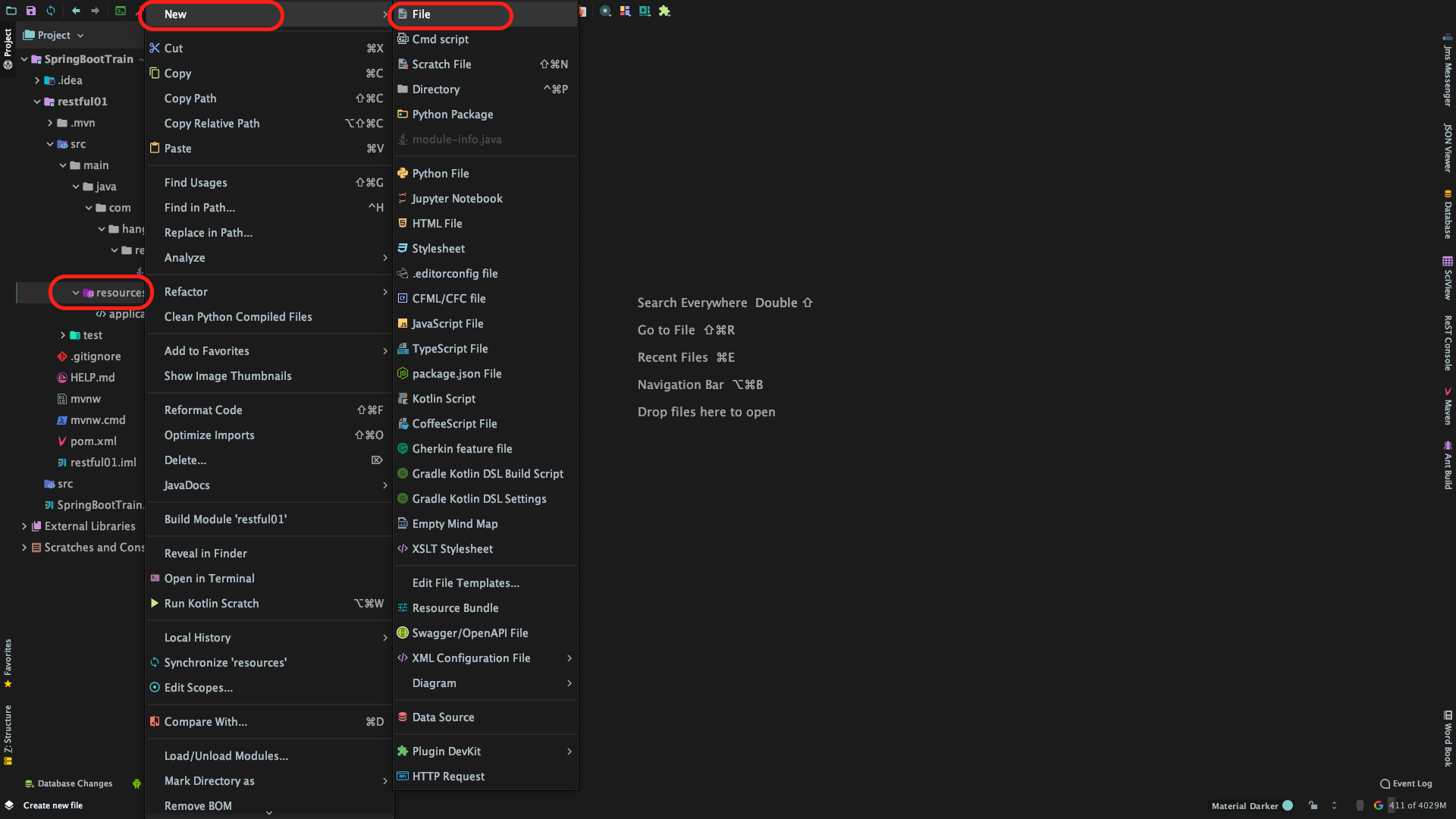
  1. 新建模块application.yml配置文件并配置SpringBoot

    • 新建模块application.yml配置文件

      • Step 1:
      • Step 2:
    • 配置SpringBoot

      server:
      port: 8088
      servlet:
      context-path: /api #项目名称

      swagger:
      print-init: true #非必需,默认false
      enabled: true #必需

      spring:
      profiles:
      active: local #@spring.active@ #默认使用本地配置文件
      datasource:
      driver-class-name: org.postgresql.Driver
      url: jdbc:postgresql://120.79.90.37:5432/learning
      username: learning
      password: **************
      db-name: learning
      db-schema: swagger2

      mybatis-plus:
      mapper-locations: classpath:/com/hanwang/restful01/mapper/xml/*Mapper.xml
      #实体扫描,多个package用逗号或者分号分隔
      typeAliasesPackage: com.hanwang.restful01.entity
      typeEnumsPackage: com.baomidou.springboot.db.entity.enums
      global-config:
      #刷新mapper 调试神器
      db-config:
      #主键类型 0:"数据库ID自增", 1:"用户输入ID",2:"全局唯一ID (数字类型唯一ID)", 3:"全局唯一ID UUID";
      id-type: uuid
      #字段策略 0:"忽略判断",1:"非 NULL 判断"),2:"非空判断"
      field-strategy: not_empty
      #驼峰下划线转换
      column-underline: true
      #数据库大写下划线转换
      #capital-mode: true
      #逻辑删除配置
      logic-delete-value: Y
      logic-not-delete-value: N
      db-type: pgsql
      refresh: true
      sql-injector: com.baomidou.mybatisplus.extension.injector.LogicSqlInjector
      #自定义填充策略接口实现
      #meta-object-Handler: com.baomidou.springboot.xxx
      #自定义SQL注入器
      #sql-injector: com.baomidou.springboot.xxx
      configuration:
      map-underscore-to-camel-case: true
      cache-enabled: false
      generator:
      module-name: restful01
      author: gadfly
      file-override: true

      #logging
      logging:
      path: maven-logs
      level:
      root: warn
  2. 配置IDEA的数据库可视化发开组件

    • 新建数据库连接

    • 配置数据库连接方式

    • 选择数据库和框架

  3. 配置Project Structure项目结构

    module的开发目录进行文件夹分类,以让idea明白怎么去对待他们,明确哪些是存放源代码的文件夹,哪些是存放静态文件的文件夹,哪些是存放测试代码的文件夹,哪些是被排除编译的文件夹。

    • Sources:源代码存放的文件,蓝色。
    • Tests:设置测试代码存放的文件件,绿色。
    • Resources:一般对应着Sources文件,一般放配置文件,如:log4j.properties,application.yml
    • Test Resources:这个对应着Tests文件夹,存放着Tests代码的配置文件。
    • Excluded:设置配出编译检查的文件,例如我们在project模块设置的out文件夹。
    • Step 1:
    • Step 2:
    • Step 3:引入项目需要的其他第三方的SDK(如果有)

  4. 新建Package

    为了更好地组织类,Java 提供了包机制,用于区别类名的命名空间。

    • configure(配置)
    • entity(实体)

      entity的意思就是实体的意思,所以也是最常用到的,entity包中的类是必须和数据库相对应的

    • model(模型)

      model大家不陌生,都知道是模型的意思,当用model当包名的时候,一般里面存的是实体类的模型,一般是用来给前端用的。

    • service(服务)
    • mapper(数据库映射)
    • controller(控制器)
  • 新建

  • 完成

三、开发编程

configure包中新建MybatisPlus的配置类MybatisPlusConfigure.class

import com.baomidou.mybatisplus.extension.plugins.PaginationInterceptor;
import org.springframework.context.annotation.Bean;
import org.springframework.context.annotation.Configuration;

/**
* @Description : MybatisPlus配置
* ---------------------------------
*/
@Configuration
public class MybatisPlusConfigure {
@Bean
public PaginationInterceptor paginationInterceptor() {
PaginationInterceptor paginationInterceptor = new PaginationInterceptor();
// 设置请求的页面大于最大页后操作, true调回到首页,false 继续请求 默认false
// paginationInterceptor.setOverflow(false);
// 设置最大单页限制数量,默认 500 条,-1 不受限制
// paginationInterceptor.setLimit(500);
return paginationInterceptor;
}
}

configure包中新建Swagger2的配置类Swagger2Configure.class

import org.springframework.context.annotation.Bean;
import org.springframework.context.annotation.Configuration;
import springfox.documentation.builders.ApiInfoBuilder;
import springfox.documentation.builders.PathSelectors;
import springfox.documentation.builders.RequestHandlerSelectors;
import springfox.documentation.service.ApiInfo;
import springfox.documentation.spi.DocumentationType;
import springfox.documentation.spring.web.plugins.Docket;
import springfox.documentation.swagger2.annotations.EnableSwagger2;

@Configuration
@EnableSwagger2
public class Swagger2Configure {
/**
* 通过 createRestApi函数来构建一个DocketBean
* 函数名,可以随意命名,喜欢什么命名就什么命名
*/
@Bean
public Docket createRestApi() {
return new Docket( DocumentationType.SWAGGER_2 )
.apiInfo( apiInfo() )//调用apiInfo方法,创建一个ApiInfo实例,里面是展示在文档页面信息内容
.select()
//控制暴露出去的路径下的实例
//如果某个接口不想暴露,可以使用以下注解
//@ApiIgnore 这样,该接口就不会暴露在 swagger2 的页面下
.apis( RequestHandlerSelectors.basePackage( "com.hanwang.restful01.controller" ) )
.paths( PathSelectors.any() )
.build();
}

//构建 api文档的详细信息函数
private ApiInfo apiInfo() {
return new ApiInfoBuilder()
//页面标题
.title( "云南汉王科技 Spring Boot Swagger2 构建RESTful API" )
//条款地址
.termsOfServiceUrl( "http://www.ynhanwang.com/" )
.contact( "GadflyBSD" )
.version( "1.0" )
//描述
.description( "云南汉王科技Java8 SpringBoot框架开发培训" )
.build();
}
}

entity包中新建数据库表user的实体类User.class

import com.baomidou.mybatisplus.annotation.IdType;
import com.baomidou.mybatisplus.extension.activerecord.Model;
import com.baomidou.mybatisplus.annotation.TableId;
import java.time.LocalDateTime;
import com.baomidou.mybatisplus.annotation.TableField;
import java.io.Serializable;
import com.baomidou.mybatisplus.annotation.TableName;
import io.swagger.annotations.ApiModel;
import io.swagger.annotations.ApiModelProperty;
import lombok.Data;
import lombok.EqualsAndHashCode;
import lombok.experimental.Accessors;
import pub.gadfly.sdk.Handler.JSONTypePG;
import pub.gadfly.sdk.Handler.ByteToByteaTypePG;
import pub.gadfly.sdk.Handler.UUIDTypePG;

/**
* <p>
* 用户信息表 实体类
* </p>
*
* @author gadfly
* @since 2019-12-20
*/
@Data
@EqualsAndHashCode(callSuper = true)
@Accessors(chain = true)
@ApiModel(value = "User对象", description = "用户信息表")
public class User extends Model<User> {

private static final long serialVersionUID=1L;

@ApiModelProperty(value = "记录主键(系统自动生成ID)")
@TableId(value = "id", type = IdType.AUTO)
private Integer id;

@ApiModelProperty(value = "真实姓名")
@TableField("realname")
private String realname;

@ApiModelProperty(value = "联系电话")
@TableField("mobile")
private String mobile;

@ApiModelProperty(value = "电子邮件")
@TableField("email")
private String email;

@ApiModelProperty(value = "用户公钥")
@TableField("public_key")
private String publicKey;

@ApiModelProperty(value = "用户私钥")
@TableField("private_key")
private String privateKey;

@ApiModelProperty(value = "创建时间")
@TableField("insert_time")
private LocalDateTime insertTime;

@ApiModelProperty(value = "变更时间")
@TableField("modify_time")
private LocalDateTime modifyTime;


public static final String ID ="id";
public static final String REALNAME ="realname";
public static final String MOBILE ="mobile";
public static final String EMAIL ="email";
public static final String PUBLIC_KEY ="public_key";
public static final String PRIVATE_KEY ="private_key";
public static final String INSERT_TIME ="insert_time";
public static final String MODIFY_TIME ="modify_time";

@Override
protected Serializable pkVal(){
return this.id;
}

}

mapper包中新建数据库表user的数据库映射接口UserMapper.class

import com.hanwang.restful01.entity.User;
import com.baomidou.mybatisplus.core.mapper.BaseMapper;
import org.apache.ibatis.annotations.Mapper;
import org.springframework.stereotype.Repository;

/**
* <p>
* 用户信息表 Mapper 接口
* </p>
*
* @author gadfly
* @since 2019-12-20
*/
@Mapper
@Repository
public interface UserMapper extends BaseMapper<User> {

}

mapper.xml包中新建数据库表user的实体类UserMapper.xml

<?xml version="1.0" encoding="UTF-8"?>
<!DOCTYPE mapper PUBLIC "-//mybatis.org//DTD Mapper 3.0//EN" "http://mybatis.org/dtd/mybatis-3-mapper.dtd">
<mapper namespace="com.hanwang.restful01.mapper.UserMapper">

<!-- 开启二级缓存 -->
<cache type="org.mybatis.caches.ehcache.LoggingEhcache"/>

<!-- 通用查询映射结果 -->
<resultMap id="BaseResultMap" type="com.hanwang.restful01.entity.User">
<id column="id" property="id"/>
<result column="realname" property="realname"/>
<result column="mobile" property="mobile"/>
<result column="email" property="email"/>
<result column="public_key" property="publicKey"/>
<result column="private_key" property="privateKey"/>
<result column="insert_time" property="insertTime"/>
<result column="modify_time" property="modifyTime"/>
</resultMap>

<!-- 通用查询结果列 -->
<sql id="Base_Column_List">
id, realname, mobile, email, public_key, private_key, insert_time, modify_time
</sql>

</mapper>

service包中新建服务接口UserService.class

import com.baomidou.mybatisplus.core.conditions.Wrapper;
import com.baomidou.mybatisplus.core.metadata.IPage;
import com.baomidou.mybatisplus.extension.service.IService;
import com.hanwang.restful01.entity.User;
import com.baomidou.mybatisplus.extension.service.IService;

import java.util.List;

/**
* <p>
* 用户信息表 服务类
* </p>
*
* @author gadfly
* @since 2019-12-20
*/
public interface UserService extends IService<User> {

/**
* 分页数据查询
* @param page
* @param param
* @return
*/
IPage<User> selectPage(IPage<User> page, User param);

/**
* 通过查询构造器获取数据列表
* @param param
* @return
*/
List<User> selectList(User param);

/**
* 通过ID获取数据
* @param id
* @return
*/
User getById(String id);

/**
* 通过ID删除数据
* @param id
* @return
*/
Boolean removeById(String id);

/**
* 通过ID更新数据
* @param param
* @return
*/
User saveById(User param);

/**
* 添加新的数据
* @param param
* @return
*/
User add(User param);
}

service.impl包中新建服务接口的实现类UserServiceImpl.class

import com.baomidou.mybatisplus.core.metadata.IPage;
import com.baomidou.mybatisplus.core.conditions.query.QueryWrapper;
import com.hanwang.restful01.entity.User;
import com.hanwang.restful01.mapper.UserMapper;
import com.hanwang.restful01.service.UserService;
import com.baomidou.mybatisplus.extension.service.impl.ServiceImpl;
import org.springframework.stereotype.Service;
import org.springframework.beans.factory.annotation.Autowired;
import org.springframework.transaction.annotation.Transactional;
import org.apache.commons.lang3.StringUtils;
import java.util.List;
/**
* <p>
* 用户信息表 服务实现类
* </p>
*
* @author gadfly
* @since 2019-12-20
*/
@Service
@Transactional
public class UserServiceImpl extends ServiceImpl<UserMapper, User> implements UserService {


@Autowired
private UserMapper userMapper;

@Override
public IPage<User> selectPage(IPage<User> page, User user){
return userMapper.selectPage(page, getEntityWrapper(user));
}

@Override
public List<User> selectList(User user){
return userMapper.selectList(getEntityWrapper(user));
}

@Override
public User getById(String id){
return userMapper.selectById(id);
}

@Override
public User saveById(User user){
userMapper.updateById(user);
return user;
}

@Override
public User add(User user){
userMapper.insert(user);
return user;
}

@Override
public Boolean removeById(String id){
return (userMapper.deleteById(id) > 0) ? true : false;
}

/**
* 公共查询条件
* @param user
* @return
*/
public QueryWrapper<User> getEntityWrapper(User user){
QueryWrapper wrapper = new QueryWrapper();
//条件拼接
if(StringUtils.isNotBlank(user.getRealname().toString())){
wrapper.like(User.REALNAME, user.getRealname().toString());
}
if(StringUtils.isNotBlank(user.getMobile().toString())){
wrapper.like(User.MOBILE, user.getMobile().toString());
}
if(StringUtils.isNotBlank(user.getEmail().toString())){
wrapper.like(User.EMAIL, user.getEmail().toString());
}
if(StringUtils.isNotBlank(user.getPublicKey().toString())){
wrapper.like(User.PUBLIC_KEY, user.getPublicKey().toString());
}
if(StringUtils.isNotBlank(user.getPrivateKey().toString())){
wrapper.like(User.PRIVATE_KEY, user.getPrivateKey().toString());
}
if(StringUtils.isNotBlank(user.getInsertTime().toString())){
wrapper.like(User.INSERT_TIME, user.getInsertTime().toString());
}
if(StringUtils.isNotBlank(user.getModifyTime().toString())){
wrapper.like(User.MODIFY_TIME, user.getModifyTime().toString());
}
return wrapper;
}
}

controller包中新建控制器类UserController.class

import org.springframework.web.bind.annotation.*;
import org.springframework.beans.factory.annotation.Autowired;
import com.baomidou.mybatisplus.core.metadata.IPage;
import com.baomidou.mybatisplus.extension.plugins.pagination.Page;
import io.swagger.annotations.*;
import com.hanwang.restful01.service.UserService;
import com.hanwang.restful01.entity.User;
import org.slf4j.Logger;
import org.slf4j.LoggerFactory;
import pub.gadfly.sdk.Utils.ResponseHandler;
import pub.gadfly.sdk.Utils.StringUtils;
import java.sql.*;
import java.util.List;
import java.time.LocalTime;
import java.time.LocalDate;
import java.time.LocalDateTime;
import java.math.BigInteger;
import java.math.BigDecimal;
import java.util.UUID;
import com.alibaba.fastjson.JSON;

/**
* @description : 用户信息表 控制器 AUTO
* @author gadfly
* @since 2019-12-20
*/
@Api(tags = "用户信息表 接口", description = "关于 用户信息表 的API接口")
@RestController
@RequestMapping("/user")
public class UserController {
private final Logger logger=LoggerFactory.getLogger(UserController.class);

@Autowired
public UserService userService;

/**
* @description : 用户信息表 获取分页列表
* ---------------------------------
* @author : gadfly
* @since : Create in 2019-12-20
*/
@ApiOperation(value = "用户信息表 获取分页列表", notes = "")
@RequestMapping(value = "/getUserPage", method = RequestMethod.GET)
@ApiImplicitParams({
@ApiImplicitParam(dataType = "int", name = "pageNo", value = "起始页", example = "1", required = true),
@ApiImplicitParam(dataType = "int", name = "pageSize", value = "每页记录数", example = "20", required = true)
})
public ResponseHandler<User> getUserPage(
@RequestParam int pageNo,
@RequestParam int pageSize,
@RequestBody @ApiParam(name="用户信息表 对象",value="传入json格式") User params){
try{
Page<User> page = new Page(pageNo, pageSize);
IPage<User> pageList = userService.selectPage(page, params);
return ResponseHandler.resultList(pageList.getRecords(), page, "成功获取 用户信息表 获取分页列表");
}catch(Exception e){
logger.warn("异常信息:{}" + e.getMessage());
return ResponseHandler.resultError("异常信息:{"+e.getClass().getName()+"}");
}
}

/**
* @description : 用户信息表 获取列表
* ---------------------------------
* @author : gadfly
* @since : Create in 2019-12-20
*/
@ApiOperation(value = "用户信息表 获取列表", notes = "")
@RequestMapping(value = "/getUserSelect", method = RequestMethod.GET)
public ResponseHandler<User> getUserSelect(@RequestBody @ApiParam(name="用户信息表 对象",value="传入json格式") User params){
try{
List<User> selectList = userService.selectList(params);
return ResponseHandler.resultBody(selectList, "成功获取 用户信息表 获取分页列表");
}catch(Exception e){
logger.warn("异常信息:{}" + e.getMessage());
return ResponseHandler.resultError("异常信息:{"+e.getClass().getName()+"}");
}
}

/**
* @description : 通过id获取用户信息表
* ---------------------------------
* @author : gadfly
* @since : Create in 2019-12-20
*/
@ApiOperation(value = "通过id获取用户信息表", notes = "")
@RequestMapping(value = "/getUserById", method = RequestMethod.GET)
@ApiImplicitParam(dataType="int", name = "id", value = "用户ID", example = "1", required = true)
public ResponseHandler<User> getUserById(
@RequestParam Integer id
){
try{
User param= userService.getById(id);
return ResponseHandler.resultBody(param, "成功通过id获取用户信息表");
}catch(Exception e){
logger.warn("异常信息:{}" + e.getMessage());
return ResponseHandler.resultError("异常信息:{"+e.getClass().getName()+"}");
}
}

/**
* @description : 通过id删除用户信息表
* ---------------------------------
* @author : gadfly
* @since : Create in 2019-12-20
*/
@ApiOperation(value = "通过id删除用户信息表", notes = "")
@RequestMapping(value = "/deleteUserById", method = RequestMethod.GET)
@ApiImplicitParam(dataType="int", name = "id", value = "用户ID", example = "1", required = true)
public ResponseHandler<User> deleteUserById(
@RequestParam Integer id
){
try{
return ResponseHandler.resultBody(id, "成功通过id删除用户信息表");
}catch(Exception e){
logger.warn("异常信息:{}" + e.getMessage());
return ResponseHandler.resultError("异常信息:{"+e.getClass().getName()+"}");
}
}

/**
* @description : 通过id更新UserList
* ---------------------------------
* @author : gadfly
* @since : Create in 2019-12-16
*/

@ApiOperation(value = "通过id更新用户信息表", notes = "Beta 测试")
@RequestMapping(value = "/updateUserById", method = RequestMethod.POST)
@ApiImplicitParams({
@ApiImplicitParam(name = "id", value = "记录主键(系统自动生成ID)", defaultValue = ""),
@ApiImplicitParam(name = "realname", value = "真实姓名", defaultValue = ""),
@ApiImplicitParam(name = "mobile", value = "联系电话", defaultValue = ""),
@ApiImplicitParam(name = "email", value = "电子邮件", defaultValue = ""),
@ApiImplicitParam(name = "public_key", value = "用户公钥", defaultValue = ""),
@ApiImplicitParam(name = "private_key", value = "用户私钥", defaultValue = ""),
@ApiImplicitParam(name = "insert_time", value = "创建时间", defaultValue = ""),
@ApiImplicitParam(name = "modify_time", value = "变更时间", defaultValue = "")
})
public ResponseHandler<User> updateUserListById(
String id,
String realname,
String mobile,
String email,
String public_key,
String private_key,
String insert_time,
String modify_time
){
try{
User params = new User();
params.setId(StringUtils.typeCase(Integer.class, id));
params.setRealname(realname);
params.setMobile(mobile);
params.setEmail(email);
params.setPublicKey(public_key);
params.setPrivateKey(private_key);
params.setInsertTime(StringUtils.typeCase(LocalDateTime.class, insert_time));
params.setModifyTime(StringUtils.typeCase(LocalDateTime.class, modify_time));
return ResponseHandler.resultBody(userService.saveById(params), "成功通过id更新用户信息表");
}catch(Exception e){
logger.warn("异常信息:{}" + e.getMessage());
return ResponseHandler.resultError("异常信息:{"+e.getClass().getName()+"}");
}
}

/**
* @description : 通过id更新用户信息表
* ---------------------------------
* @author : gadfly
* @since : Create in 2019-12-20
*/
@ApiOperation(value = "通过id更新用户信息表数据", notes = "")
@RequestMapping(value = "/updateUserByIdUseJson", method = RequestMethod.POST)
public ResponseHandler<User> updateUserById(@RequestBody @ApiParam(name="用户信息表 对象",value="传入json格式",required=true) User params){
try{
return ResponseHandler.resultBody(userService.saveById(params), "成功通过id更新用户信息表");
}catch(Exception e){
logger.warn("异常信息:{}" + e.getMessage());
return ResponseHandler.resultError("异常信息:{"+e.getClass().getName()+"}");
}
}

/**
* @description : 添加用户信息表
* ---------------------------------
* @author : gadfly
* @since : Create in 2019-12-20
*/
@ApiOperation(value = "添加用户信息表数据", notes = "Beta 测试")
@RequestMapping(value = "/addUser", method = RequestMethod.POST)
@ApiImplicitParams({
@ApiImplicitParam(name = "realname", value = "真实姓名", defaultValue = ""),
@ApiImplicitParam(name = "mobile", value = "联系电话", defaultValue = ""),
@ApiImplicitParam(name = "email", value = "电子邮件", defaultValue = ""),
@ApiImplicitParam(name = "public_key", value = "用户公钥", defaultValue = ""),
@ApiImplicitParam(name = "private_key", value = "用户私钥", defaultValue = ""),
@ApiImplicitParam(name = "insert_time", value = "创建时间", defaultValue = ""),
@ApiImplicitParam(name = "modify_time", value = "变更时间", defaultValue = "")
})
public ResponseHandler<User> addUser(
String realname,
String mobile,
String email,
String public_key,
String private_key,
String insert_time,
String modify_time
){
try{
User params = new User();
params.setRealname(realname);
params.setMobile(mobile);
params.setEmail(email);
params.setPublicKey(public_key);
params.setPrivateKey(private_key);
params.setInsertTime(StringUtils.typeCase(LocalDateTime.class, insert_time));
params.setModifyTime(StringUtils.typeCase(LocalDateTime.class, modify_time));
return ResponseHandler.resultBody(userService.add(params), "成功添加用户信息表");
}catch(Exception e){
logger.warn("异常信息:{}" + e.getMessage());
return ResponseHandler.resultError("异常信息:{"+e.getClass().getName()+"}");
}
}

/**
* @description : 传入JSON格式数据添加用户信息表数据
* ---------------------------------
* @author : gadfly
* @since : Create in 2019-12-16
*/
@ApiOperation(value = "添加用户信息表数据(传入JSON格式数据)", notes = "")
@RequestMapping(value = "/addUserUseJson", method = RequestMethod.POST)
public ResponseHandler<User> addUserList(@RequestBody @ApiParam(name="用户信息表 对象",value="传入json格式",required=true) User params){
try{
return ResponseHandler.resultBody(userService.add(params), "成功添加用户信息表");
}catch(Exception e){
logger.warn("异常信息:{}" + e.getMessage());
return ResponseHandler.resultError("异常信息:{"+e.getClass().getName()+"}");
}
}
}

四、测试运行

在模块入口文件打开swagger2

@EnableSwagger2

@EnableSwagger2
@SpringBootApplication
public class Restful01Application {

public static void main(String[] args) {
SpringApplication.run( Restful01Application.class, args );
}

}

运行

浏览器测试

http://localhost:8088/api/swagger-ui.html

五、换种姿势开发

正确的开发方式:使用Mybaits Plus代码生成器进行开发

  • 删除刚刚创建的entityservicemappercontroller包,及里面的所有内容

  • 修改模块入口文件Restful01Application.class

    import org.springframework.boot.CommandLineRunner;
    import org.springframework.boot.SpringApplication;
    import org.springframework.boot.autoconfigure.SpringBootApplication;
    import pub.gadfly.sdk.Utils.MybatisPlus;
    import springfox.documentation.swagger2.annotations.EnableSwagger2;

    @EnableSwagger2
    @SpringBootApplication
    public class Restful01Application implements CommandLineRunner{

    public static void main(String[] args) {
    SpringApplication.run( Restful01Application.class, args );
    }

    public void run(String[] args){
    MybatisPlus.generator(Restful01Application.class);
    }

    }
  • 运行模块 --> 停止运行

  • 自动生成代码

  • 注释掉代码生成器

    import org.springframework.boot.CommandLineRunner;
    import org.springframework.boot.SpringApplication;
    import org.springframework.boot.autoconfigure.SpringBootApplication;
    import pub.gadfly.sdk.Utils.MybatisPlus;
    import springfox.documentation.swagger2.annotations.EnableSwagger2;

    @EnableSwagger2
    @SpringBootApplication
    public class Restful01Application implements CommandLineRunner{

    public static void main(String[] args) {
    SpringApplication.run( Restful01Application.class, args );
    }

    public void run(String[] args){
    //MybatisPlus.generator(Restful01Application.class);
    }

    }
六、打包分发

  • 重新引入第三方jar包

  • 修改pom.xml 指定Marven的第三方包引入路径

    <dependency>
    <groupId>pub.gadfly</groupId>
    <artifactId>sdk</artifactId>
    <version>1.0.5</version>
    <scope>system</scope>
    <systemPath>${basedir}/src/main/libs/sdk-1.0.5-SNAPSHOT.jar</systemPath>
    </dependency>
  • 部署

    • Step 1:

    • Step 2:

  • 打包

文章作者: Gadfly
文章链接: https://blog.gadfly.pub/2019/12/20/cheng-xu-she-ji/shi-yong-idea-chuang-jian-springboot-de-api-xiang-mu/
版权声明: 本博客所有文章除特别声明外,均采用 CC BY-NC-SA 4.0 许可协议。转载请注明来自 牛虻的世界
打赏
  • 微信
  • 支付寶

评论